Need help?
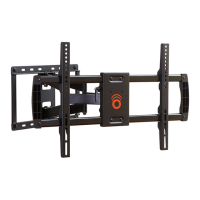
Do you have a question about the Echogear EGMF2 and is the answer not in the manual?
Choose the correct screws and washers for your TV's VESA mounting holes.
Determine if spacers are required for flat, inset, or rounded TVs to ensure proper bracket fit.
Mount the TV brackets to the back of your TV, ensuring they are level and correctly positioned.
Locate wall studs using a stud finder or by verifying edges with an awl/drill bit.
Use the template and a level to mark pilot hole locations on the wall stud.
Drill pilot holes using the specified drill bit size for secure lag bolt insertion.
Attach the wall plate to the wall using lag bolts, ensuring it is level.
Use the template and a level to mark pilot hole locations on the concrete wall.
Drill holes using the specified drill bit size for concrete anchors.
Insert concrete anchors into the drilled holes, ensuring they are flush.
Attach the wall plate to the wall using lag bolts, ensuring it is level.
Slide the decorative cover onto the mounted wall plate.
Remove the end cap from the extension bracket.
Attach the extension brackets to the wall plate assembly.
Secure the extension brackets using the provided screws and knobs.
Prepare the TV brackets by opening the safety locks.
Carefully lift and hang the TV onto the wall plate, ensuring proper engagement.
Install safety screws to lock the TV onto the wall plate, preventing accidental detachment.
Use the provided clips to organize and route TV cables neatly.
Adjust the leveling screw to ensure the TV is horizontally straight.
Adjust the tension knob to control the TV's tilt and prevent unwanted movement.
Tighten screws at rotation points to correct unwanted TV drift or sag.
Follow steps to safely detach the TV from the wall mount.
 General
| Brand | Echogear |
|---|---|
| Model | EGMF2 |
| Category | Racks & Stands |
| Language | English |

 To Next Page