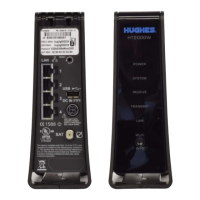
10
Chapter 1 ● Satellite modem overview
1041264-0001 Revision A
Contact information
If you need operational, warranty, or repair support, who you should contact
depends on where you purchased your satellite modem. Please contact a customer
care representative in accordance with your service agreement.
Power supply information
• Always use the power supply provided with the satellite modem. The
modem's performance may suffer if the wrong power supply is used.
• Connect the power supply to a grounded outlet. A suitable surge
protector is recommended to protect the satellite modem from
possible damage due to power surges.
• Always connect the DC power cord to the HT2000W
applying power to the power supply. If you apply power to the power
supply and then connect the DC power cord, the satellite modem may
not perform properly and could be damaged.
• Observe the power standards and requirements of the country
it is installed.
If there is any reason to remove power from the satellite modem, always
unplug the
AC power cord from the power source (power outlet, power strip,
or surge protector). Do not remove the DC power cord from the modem's rear
panel. Doing so could result in an electrical shock or damage the modem.
-apply power to the modem, plug the AC power cord into the


 To Next Page
 Loading...