8
Chapter 1 ● Satellite modem overview
1041264-0001 Revision A
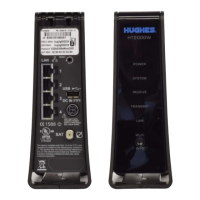
• Do not press the reset/rescue button on the HT2000W unless a customer
service representative tells you to do so.
The USB port is provided to support a future modem feature. Hughes does
not recommend plugging anything into this port at this time. Hughes will
inform you when this feature is available.
Operating environment
Observe the following requirements for the modem's operating environment.
Ventilation and heat sources
The modem must be adequately ventilated and kept away from sources of heat.
• Do not block any of the modem's ventilation openings.
•
Leave 6 inches of space around the top and sides of the modem to ensure
adequate ventilation and prevent overheating.
Do not place the modem near a heat source, such as direct sunlight, a radiator, a
heat register or vent, oven, stove, amplifier, or other apparatus that produces
heat.


 To Next Page
 Loading...