6.2 Effect description
L.F.O Filter
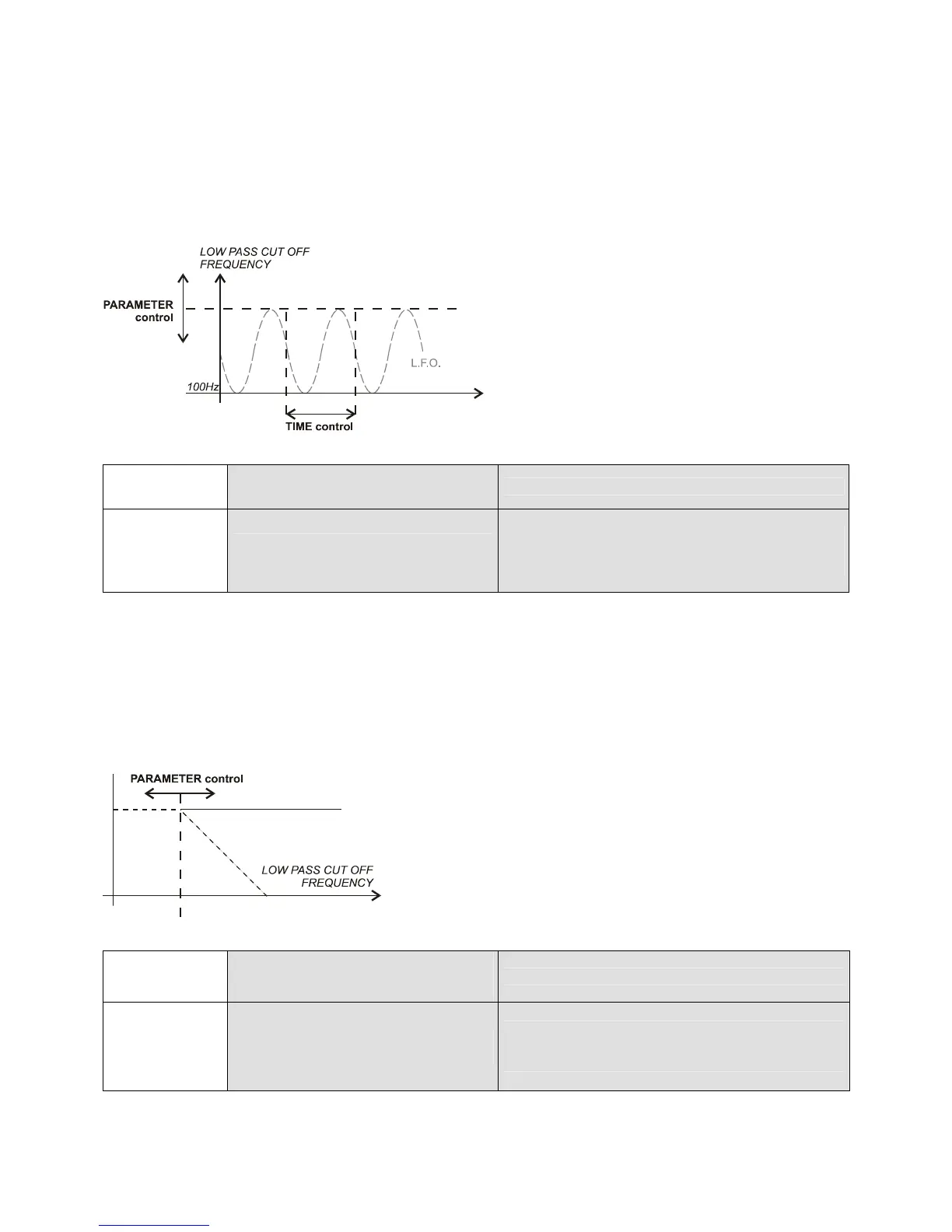
A low pass filter is moved “in-beat” by an oscillator to create a synchronized “sound wave” effect.
If you slowly turn right the PARAMETER control (from “000” to “100”), you will boost the oscillation increasing the
maximum frequency cut-off: the music signal will start oscillating “in-beat” in the low frequencies and then oscillate
more and more in higher frequencies.
TIME
PARAMETER
L.F.O Filter
Oscillation cycle length
from 0.5 to 8 beat-pattern*
Oscillation cycle amplitude
Maximum oscillation cut-off
frequency from 100 (0%) to 12kHz (100%)
* 1 beat-pattern = 4 beats
Low Pass Filter
A filter that attenuates high frequency components of a signal. “Manual” Low Pass Filter should be manipulated
with a 100% WET MIX: placing the mixer WET/DRY crossfader (25) on “WET”.
You can manually move the filter “cut-off” frequency and mix for example a new track “opening” the filter
(PARAMETER “000”->”100”) which will “fade-in” the sound from bass to high frequencies!
TIME
PARAMETER
Low Pass Filter
---
(Manual)
Low Pass filter cut-off
frequency from
20kHz (0%) to “bypass” (100%)


 To Next Page