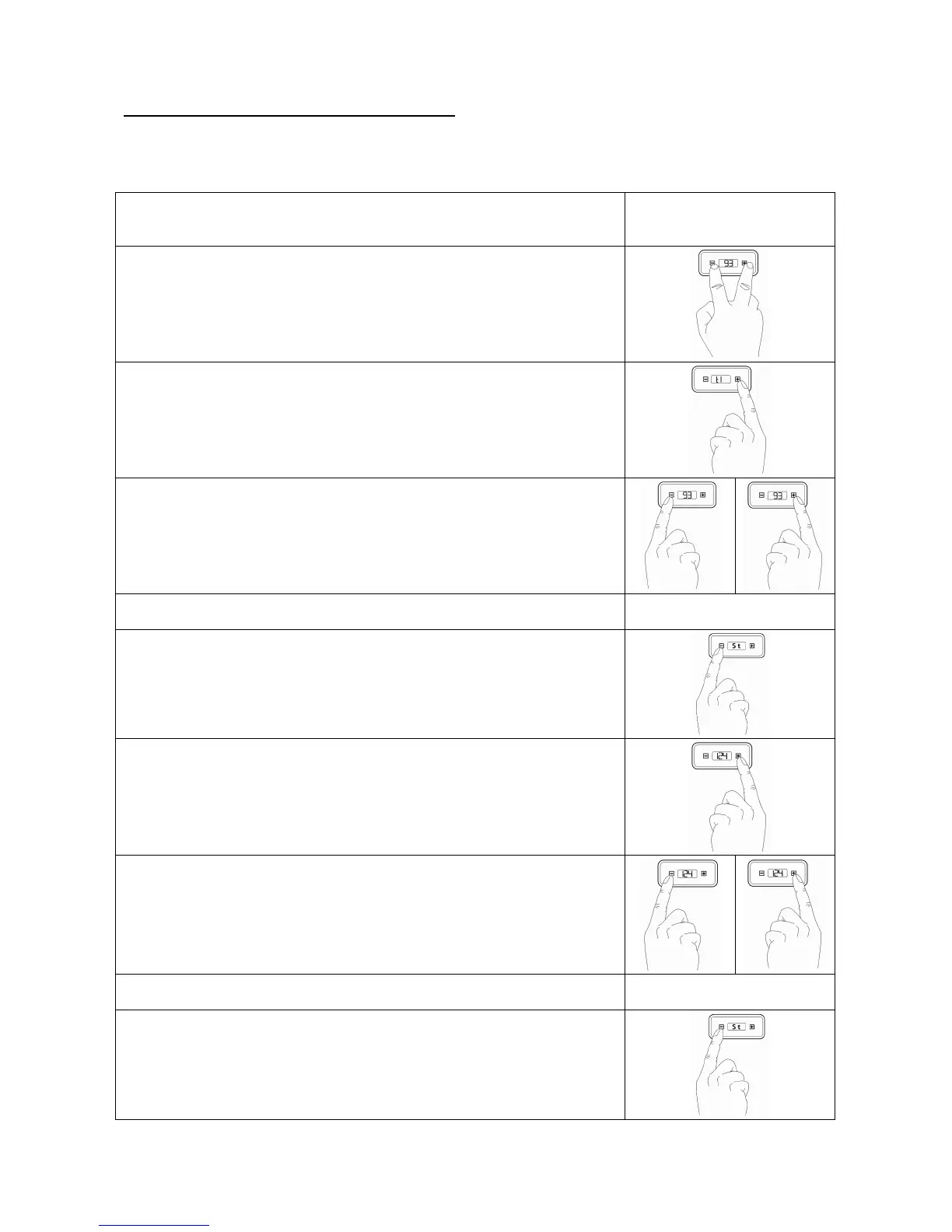
6.4 Programming the temperature via the PID-display
During normal operations the temperature of the boiler is indicated on the display. The coffee temperature control is
pre-programmed to 93°C. Description: t1 = coffee, St = steam.
Switch the machine on in order to activate the boiler. The temperature of the
boiler is of no importance in programming. The heater is inactive during
programming.
2. Press
+
and
–
at the same time until ‘t1’ appears on the display,
3. Press
+
in order to progress to the submenu of ‘t1’ and to change the
temperature value. The nominal temperature value is displayed.
4. Quickly press
-
to decrease
+
to increase
the nominal temperature value.
5. Please wait a short while after having set the nominal temperature value;
‘t1’ will be displayed
6. Press
-
in order to display ‘St’ (steam boiler). If you would like to change just
‘St’ and leave ‘t1’ unchanged, press
–
after step 2 in order to progress directly to
‘St’ and skip ‘t1’. Continue with step 7.
7. Press
+
in order to progress to the submenu of ‘St’ and to change the
temperature value. The nominal temperature value is displayed.
8. Quickly press
-
to decrease
+
to increase
the nominal temperature value.
9. Please wait a short while after having set the nominal temperature value;
‘t1’ will be displayed.
10. Press
–
in order to leave the programming mode. The newly programmed,
nominal temperatures are now saved. The heater is now activated successively.


 To Next Page