27
WIRING CONNECTIONS FOR 110 VOLT OPERATION
POWER CONNECTIONS
HEATER CONNECTION
WIRING CONNECTIONS FOR 220 VOLT OPERATION
POWER CONNECTIONS
HEATER CONNECTION
BREAKER SETTING
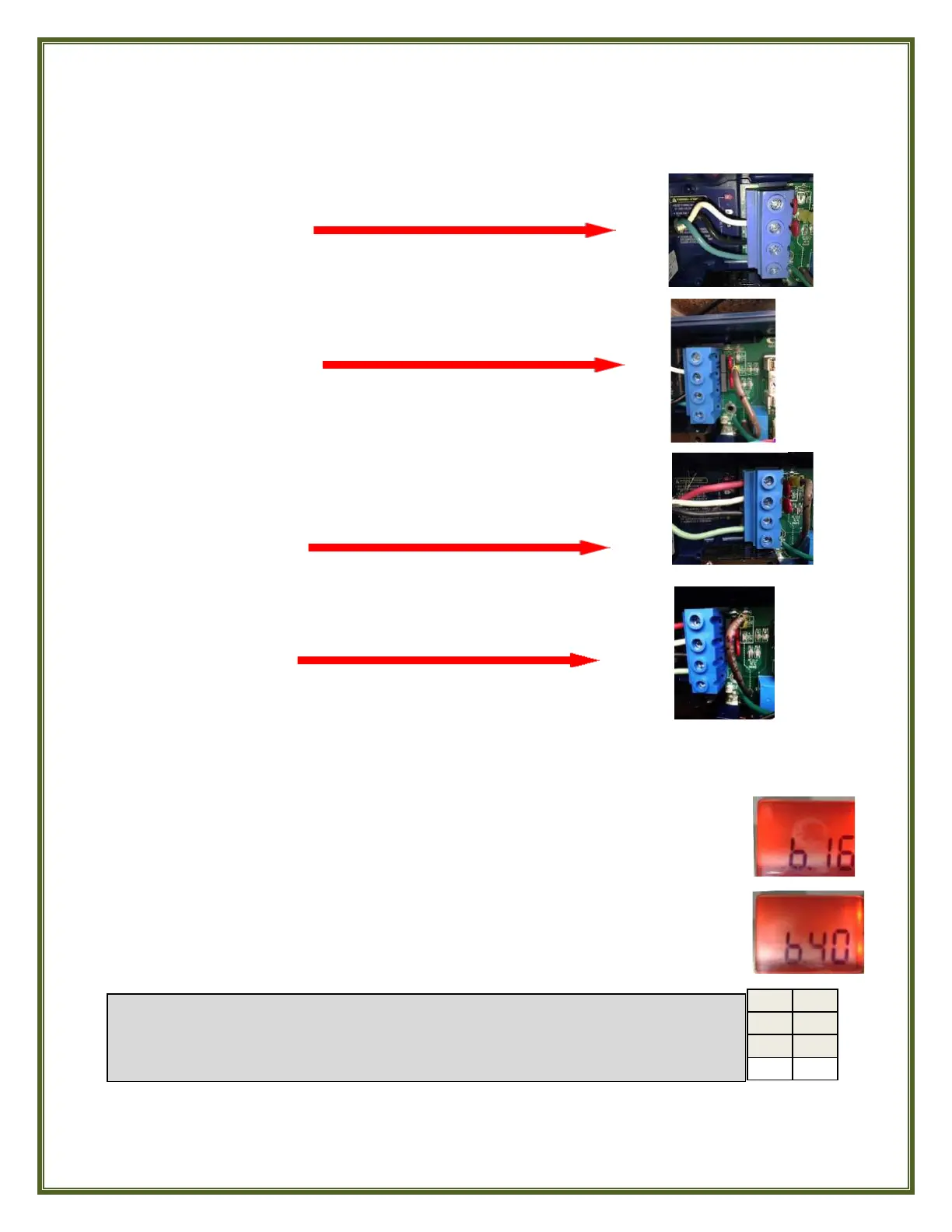
If your Eco Spa is wired for 110 Volt operation, the Control
System (‘Pack’) power terminal block 3 wiring connections should look
like this:
For the heater to operate at 1 kW on 110 Volts the brown jumper
wire’s yellow-jacketed spade lug is correctly and completely connected
from P12 to P10 like this:
Wired for 220 Volt operation, your Eco Spa’s Control System
power terminal block 4 wiring connections should look like this:
For the heater to operate at 4 kW on 220 Volts the brown jumper
wire’s yellow-jacketed spade lug is correctly and completely connected
from P12 to P9 like this
It’s important to specify the rating of the GFCI being used to ensure safe & efficient power
management by the Control System and avoid GFCI breaker tripping.
The settings values displayed by the system correspond to 80% of the GFCI’s
maximum amperage capacity. This allows ‘headroom’ to protect the system
equipment from current “spikes.”
To access the Breaker Setting menu, press and hold the LIGHT button for at least
a full 30 seconds. After 5 seconds, the Program menu parameters will appear in
the display during this time until the display stops on the factory breaker setting
of b.16 if your Eco Spa was set at the factory for 110 Volt operation.
If your Eco Spa was set at the factory to operate on 220 Volts the breaker
setting will read b.40. If you are converting your Eco Spa from 110 Volt to
220 Volt operation, use the WARM or COOL button to adjust the value from
b.16 to b.40. Press the LIGHT button once to set the rating and exit this task.



 To Next Page