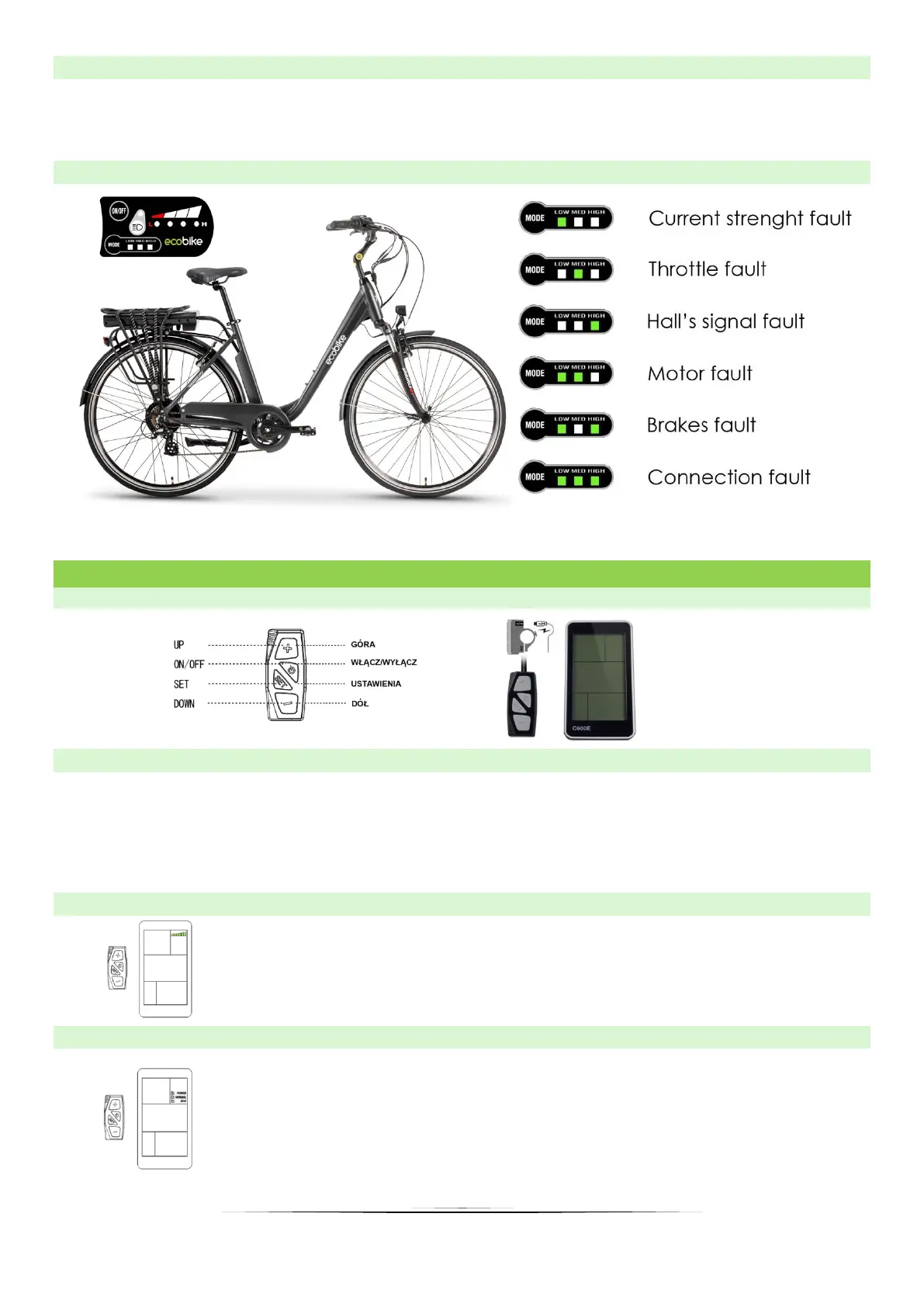
11
11.2 DRIVING INFORMATION
1. Press MODE to switch between modes.
2. Press Button “light” to ON/OFF front and rear light.
11.3 FAILURE INFORMATION ON THE DISPLAY
12. USER MANUAL OF LCD DISPLAY C600E USB
12.1 DISPLAY AND REMOTE APPEARANCE
12.2 TURNING ON/OFF THE DISPLAY
To turn the display on or off, press and hold the on / off" button for 3 seconds.
➢ When the display is off, there is no battery consumption. The current flow is not more
than 2 µA.
➢ The panel will revert to sleep mode when the speed is 0 km/h for 5 minutes.
12.3 MOTOR POWER INDICATOR
It indicates with what power the motor works, when all segments
are displayed, it means that the motor works at full power. The
battery consumption increases then.
12.4 MOTOR POWER SETTINGS
Three power modes are available to use (ECO/NORMAL/POWER).
The default option is NORMAL. The modes mean acceleration of
the bike, e.g. in the ECO mode the bike will accelerate from 0 km
/ h to 25 km / h in 15 seconds, while in the POWER mode the bike
will accelerate in 7 seconds (it also depend on road condition and
user weight).


 To Next Page