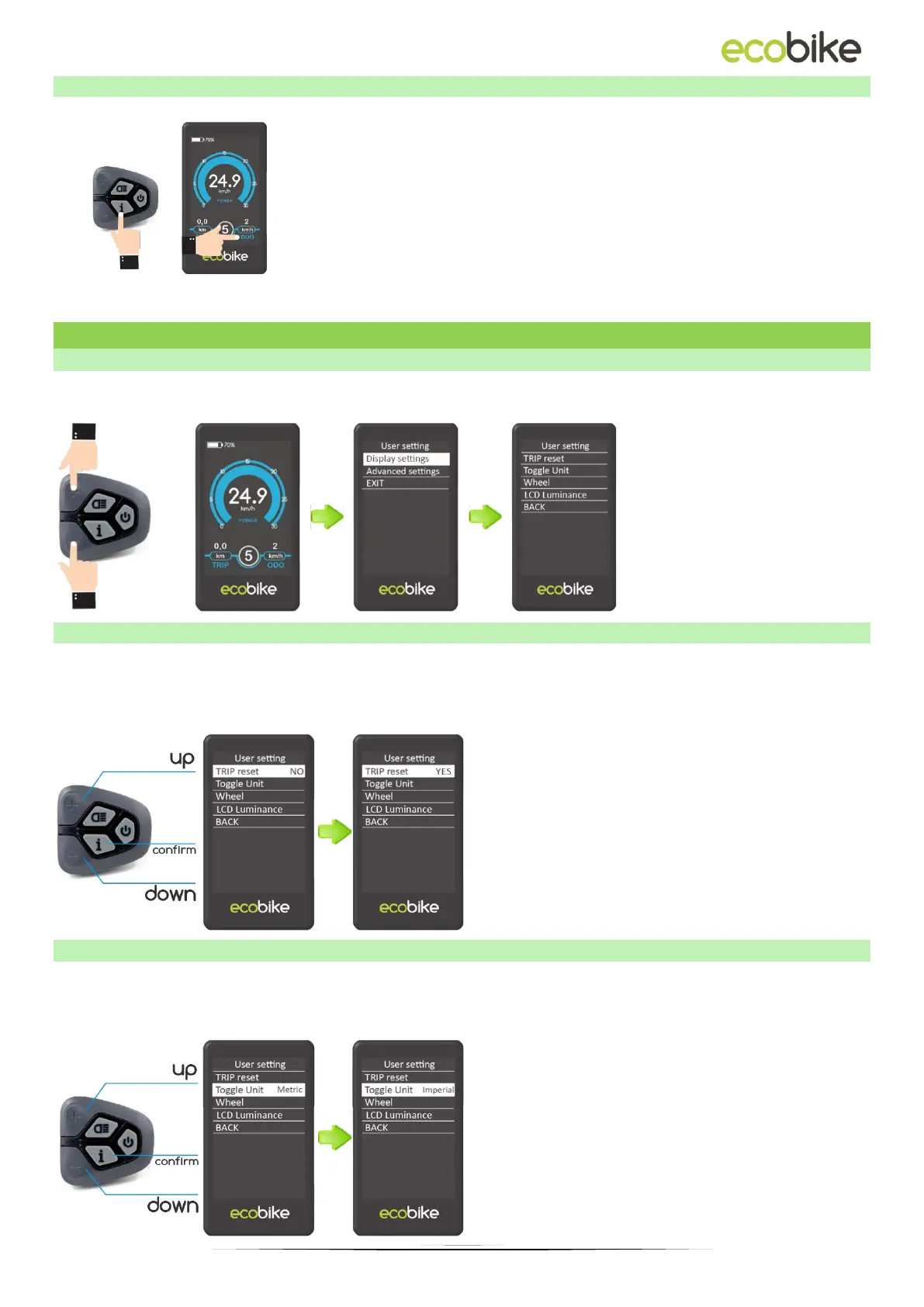
When the electrical system is turned on, the display will
show the speed and distance as defaults.
Pressing the "i" button switches between the following
information:
Trip distance (km) → ODO (km) → Max. Speed (km / h)
→ Avg. Speed (km / h) → Time (min.).
2. USER SETTINGS
2.1. ENTER THE SETTINGS MENU
To enter the display menu, press and hold the "PLUS" and "MINUS" buttons for 3 seconds.
Then select "User setting" and press the "i" button.
2.2. RESETTING THE TRIP DISTANCE
Trip Reset means resetting the trip distance. To reset the trip distance, press the "+" button
or the "-" button to select Yes / No.
YES means resetting trip distance. NO means no cleaning trip distance. To save the
changed setting, press the "i" button. The default value is NO.
2.3. UNIT SETTING
Toggle Unit means setting the measuring unit. To change the unit, press the "+" button or
the "-" button to select the desired unit, and then press the "i" button to confirm. To save
the changed setting, press the "i" button. The default unit is "Metric (km)".



 To Next Page