6
EN
Icon Name State
Remaining
battery
Rotating clockwise: charging
100%: fully charged
Flashing: at battery
Error code Refer to the EcoFlow app for details
Wi-Fi
Flashing: 1) the product is ready for pairing;
2) pair with the product via
hotspot on your phone
Solid: Internet connection succeeded
Off: Internet connection failed
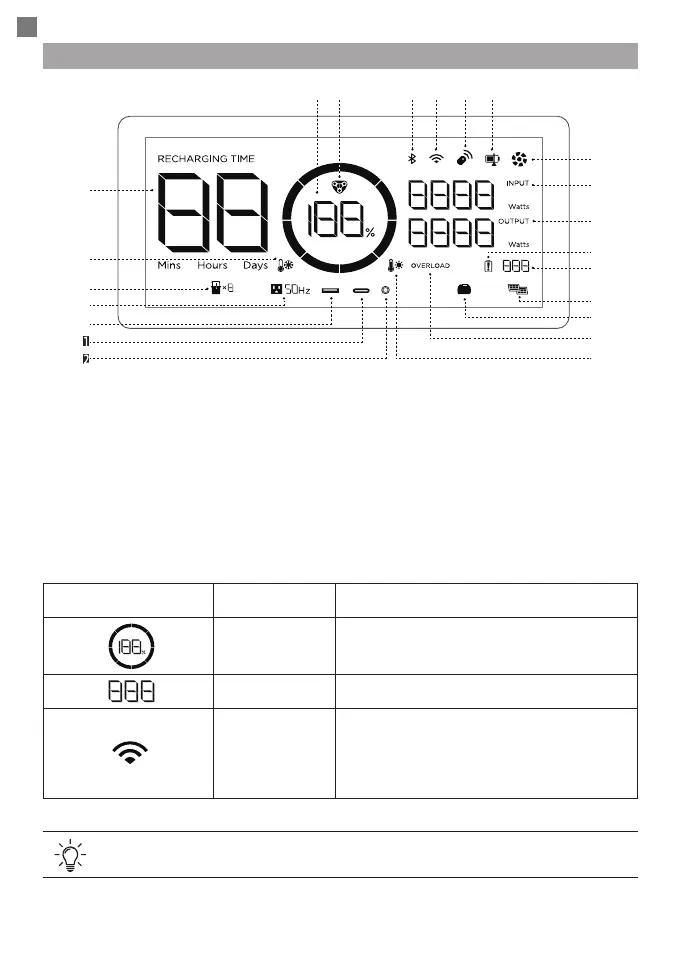
LCD Screen
Refer to "Troubleshooting" for details.
1. Remaining battery percentage
2. EV X-Stream charging indicator
3. Bluetooth connection
4. WiFi connection
5. Remote control
6. State of charge
7. Fan indicator
8. Input power
9. Output power
10. Battery failure warning
11. Error code
12. Solar charging
13. Smart generator
14. Overload warning
15. High temperature warning
16. Remaining charge/discharge time
17. Low temperature warning
18. Extra battery
19. AC output
20. USB-A output
21. USB-C output
22. DC output
❽
❼
❾
❿
⓫
⓬
❶
⓰
❻❸ ❹ ❺❷
⓭
⓮
⓯
⓱
⓲
⓳
⓴
⓴
⓴








 To Next Page