7
EN
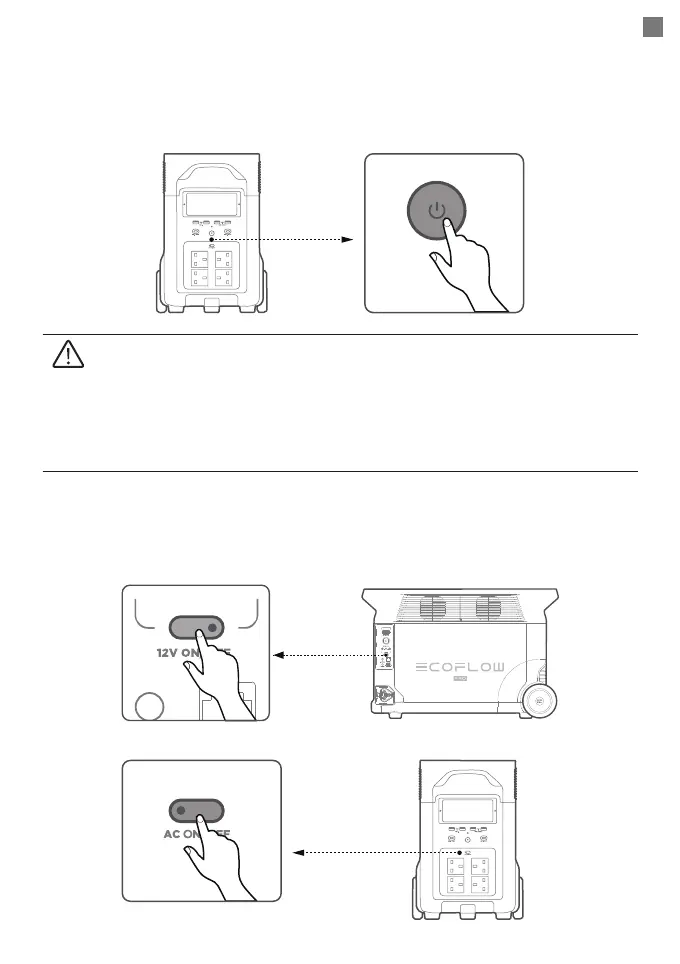
Power On/Off
Charging Your Devices
Press the main power button once to turn on the product, then the LCD screen lights up and
the main power indicator becomes breathing white; press and hold the main power button for
at least 3 seconds to turn off the product, meanwhile, the LCD screen also goes off.
Press “12V DC power button” or “AC power button” once to turn on their corresponding DC/
AC ports or sockets; press again to turn them off.
1. After main power turned on, press the main power button once to turn off the LCD
screen
2. If the product is not used for 5 minutes, it will enter hibernation state with the
LCD screen gone off. When you start to use the product again, the LCD screen
will turn on automatically.
3. The product defaults to 2 hours of standby time. With the output power buttons
turned off and no other load for 2 hours, the product will shut off automatically.
You can set the standby duration in the app.
Short press 12V DC power button
Short press AC power button








 To Next Page