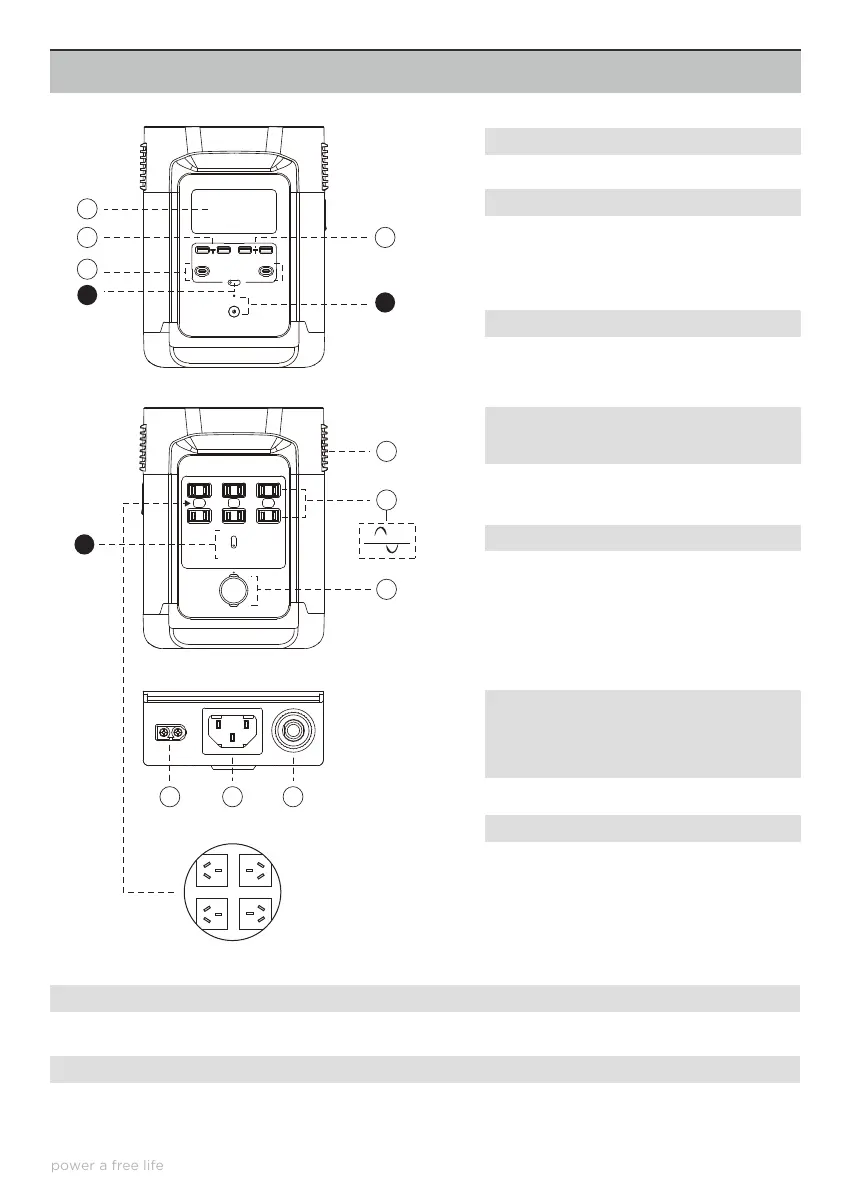
EF DELTA’S FEATURES
7. AC On/O Switch (Press and Hold
for ON/OFF) Ac Output Indicator Light
8. Ventilation Fan Vents (DO NOT Block
or inhibit airflow in any way)
9. 4 Australian 3 Pin AC Outlets.
10. DC Output Outlet and Indicator
9
1
3
6
2
5
11
12
13
10
7
4
8
ON/OFF
OUTPUT OUTPUT
DC ON/OFF
USB-A FAST CHARGE
AC ON/OFF
CAR POWER
This provides information on the charging, discharging and other conditions of the Delta unit.
1. LCD Display
Charge a wide array of devices shuch as your iPhone, Android Phone, Tablet, Go, Pro, Portable Speakers or
anything that needs to be changed through a USB-A Port. The USB-A Output Indicator light will automatically
light up when a USB-A Port is in use.
2. USB-A Output Ports
11. DC Input (Charging) Port. DC Input
from Solar or Car Cigarette Lighter DC
Output
12. 3 Pin AC Input (Charging) Port.
13. Overload Protection/Reset Switch
*EcoFlow has designed dierent AC Output sockets
in accordance with the local regulations of dierent
countries.
1. LCD Display
2. USB – A Ports
3. USB – C Output Ports
4. DC ON/OFF Switch (Press and
Hold to switch ON/OFF DC) DC
Output indicator light
5. Fast Charge USB – A Output Ports
6. Main Power On/O Button
Full Sine Wave
4








 To Next Page