Need help?
Do you have a question about the EcoFlow EFWAVE2 and is the answer not in the manual?
Precautions for heat, liquids, electrical contact, environment, and general product handling.
Covers repairs, storage, children, medical devices, environmental disposal, and product integrity.
Identification of the EcoFlow Wave 2's main parts and their functions.
Explanation of the meaning of different indicator light patterns.
Description of the icons and information shown on the LCD screen.
Operations for power, function selection, and mode switching on the unit.
How to set temperature and switch between Fahrenheit and Celsius units.
Guidance on installing exhaust ducts and using the unit indoors.
Using AC outlet, battery pack, solar panel, or car charging for power.
Instructions for external and manual drainage of condensation.
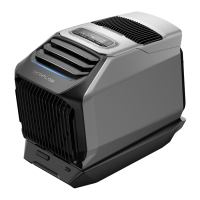
The EcoFlow Wave 2 is a portable air conditioner designed for both cooling and heating, offering versatile climate control in various environments. It is a compact and robust unit, suitable for indoor and outdoor use, including trucks, RVs, homes, and tents. The device is equipped with multiple power supply options, making it adaptable to different scenarios.
The primary function of the EcoFlow Wave 2 is to provide cooling and heating. It features a compressor-based system that can deliver 1500W of cooling and 1800W of heating capacity. Users can set the desired temperature within a range of 16°C to 30°C (60°F to 86°F). The device supports a "no-drain" function during cooling, where condensation evaporates through flash distillation. However, during heating or in high humidity conditions, complete drainage via flash distillation may not be possible, and external or manual drainage might be required. The unit includes an overflow shutdown function to prevent issues when the water tank is full.
The EcoFlow Wave 2 offers various operational modes: Max, Sleep, and Eco. In Max mode, the unit operates at high fan speed, with default cooling at 16°C (60°F) and heating at 30°C (86°F), and temperature or fan speed cannot be adjusted. In Sleep or Eco mode, it operates at low fan speed, with default cooling at 26°C (79°F) and heating at 20°C (68°F). The Eco mode for cooling involves a cycle of 20 minutes of cooling followed by 10 minutes of air blowing, which then repeats.
The device is controlled via an integrated LCD screen and physical buttons, allowing users to switch between cooling, heating, and fan functions, adjust fan speed (low, medium, high), and select operational modes. An ambient light provides visual feedback on the device's status, such as cooling (pulsating blue), heating (pulsating orange), fan (pulsating white), error (solid red), and firmware update (flashing white). The LCD displays important information including Wi-Fi/Bluetooth status, water level, external drainage indicator, current function, selected mode, fan speed, timer (app settings only), remaining charge/discharge time, add-on battery charging indicator, temperature setting/error code, error alarm, and ambient/air outlet temperature.
Connectivity features include Wi-Fi and Bluetooth, enabling remote control, monitoring, and customization through the EcoFlow app. The app allows users to manage settings, view status, and potentially access additional features like timer settings.
The EcoFlow Wave 2 is designed for ease of installation and flexible deployment. For indoor use in enclosed spaces, it is recommended to install exhaust ducts to vent waste air. The manual emphasizes that exhaust ducts should not be excessively stretched or bent to maintain optimal working efficiency. A window vent board is provided, pre-cut to fit the exhaust ducts, allowing users to adapt it to various window types (truck, RV, home) and effectively vent exhaust air. For optimal performance in enclosed spaces, it is suggested that the space be within 20m³.
For outdoor use, especially when interior space is limited or noise avoidance is desired, the Wave 2 can be placed outside, delivering cooling or heating through its front air outlet. This setup is particularly useful for camping or outdoor events.
Powering the device is versatile. It supports AC input (100-240V~50/60Hz, 820W max), car charging (12V/24V-8A, 200W max), solar input (11-60V-13A, 400W max), and external battery pack input (700W max). The AC charging cable is included and can be wound around a winder for storage. The device is compatible with EcoFlow Wave 2 add-on batteries and EcoFlow portable power stations (DELTA and DELTA 2 series are recommended) for extended operation without a direct power outlet. When using car or solar charging, it's important to ensure stable power and sufficient voltage; otherwise, only the fan function may work, requiring an add-on battery or portable power station for cooling/heating.
The device incorporates safety features such as a 2-minute downtime when switching between cooling and heating functions to protect the compressor. It also has an automatic shutdown feature if the water tank cannot collect any more water during cooling, switching to fan function to prevent overflow.
Regular maintenance is crucial for the longevity and efficient operation of the EcoFlow Wave 2. The air inlet filters (front and rear) should be regularly removed and cleaned with a damp cloth and mild detergent, then air-dried before reassembly. This prevents blockages from dust and impurities, which can affect performance.
After shutdown and storage, it is recommended to manually drain any residual water from the unit to prevent bacteria growth in damp conditions during long-term storage and to avoid water overflow when the unit is moved. The drainage outlet and connector facilitate this process.
The socket cover should be closed when the unit is stored to prevent dust ingress. For optimal storage, the product should be kept within an ambient temperature range of 20°C-30°C (68°F-86°F) and away from water sources, heat sources, and metal objects.
The device also provides error alarm indications on the LCD, guiding users to troubleshooting solutions for any faults. Firmware updates are indicated by a flashing white ambient light, ensuring the device can receive performance improvements and new features. The product is designed for responsible disposal, with instructions to use return and collection systems or contact the retailer for environmentally safe recycling, preventing harm from uncontrolled waste disposal.
 General
| Refrigerant | R134a |
|---|---|
| Air Flow (Indoor) | 290 m³/h |
| Wi-Fi Connectivity | Yes |
| Remote Control | Yes |
| Timer Function | Yes |
| Auto Restart | Yes |
| Self-Cleaning Function | No |
| Cooling Capacity | 5100 BTU |
| Operating Temperature Range (Cooling) | 16°C - 32°C |

 To Next Page