Need help?
Do you have a question about the EcoFlow Wave 2 and is the answer not in the manual?
Guidelines for safe operation, covering heat, liquid, static electricity, and general precautions.
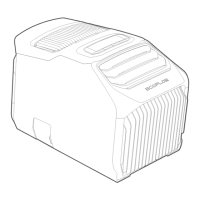
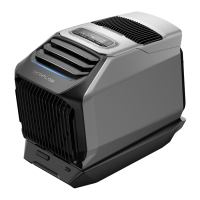
The EcoFlow Wave 2 is a portable air conditioner designed to provide cooling and heating in various environments. It is a versatile device that can be used in indoor applications, such as enclosed spaces, and outdoor settings, like tents, to deliver comfortable temperatures. The device is designed with user convenience and safety in mind, offering multiple charging methods, smart control via an app, and features for easy maintenance.
The primary function of the EcoFlow Wave 2 is to provide both cooling and heating capabilities. It operates by drawing in ambient air, processing it, and then expelling either cool or warm air, depending on the selected mode. For cooling, it utilizes a no-drain function where condensate is evaporated through flash distillation, eliminating the need for external drainage under normal conditions. However, for heating or in high ambient humidity, external drainage may be required, and the device will indicate when the water tank is full.
The device features a user-friendly interface with an LCD screen and control buttons. The LCD displays important information such as Wi-Fi/Bluetooth status, water level, external drainage indication, current function (cooling/heating/fan), mode (Max/Sleep/Eco), fan speed, timing, remaining charge/discharge time, add-on battery charge indication, temperature setting/error code, error alarm, and ambient/air outlet temperature. The control buttons allow users to power the device on/off, switch between cooling, heating, and fan functions, select operating modes, adjust temperature settings, and control fan speed.
For enhanced control and monitoring, the EcoFlow Wave 2 can be connected to the EcoFlow App. This app allows users to remotely control, monitor, and customize their device settings, providing a convenient way to manage comfort from a distance.
The EcoFlow Wave 2 offers flexible installation options for both indoor and outdoor use. For indoor applications in enclosed spaces, it is recommended to install an air conditioner exhaust duct to discharge exhaust gas, ensuring more efficient cooling or heating. The manual provides instructions for connecting the exhaust duct and emphasizes avoiding excessive stretching or bending of the duct to maintain efficiency. A window baffle is included, which can be cut to fit various window frame dimensions, allowing for proper sealing and preventing heat or cold loss.
For outdoor applications, especially when interior space is limited or noise cancellation is desired, the Wave 2 can be placed outdoors, delivering cooling or heating through the exhaust duct into the desired space, such as a tent.
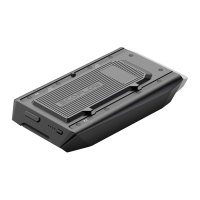
The device supports multiple charging methods to ensure continuous operation. It can be charged via AC input, car charging, solar input, or an external battery pack. The AC charging cable is designed to be wound around a winder for neat storage. When using car or solar charging, it's important to note that only the fan function is supported due to lower power and voltage instability; cooling/heating functions require an add-on battery or portable power station. The device is compatible with the EcoFlow Wave 2 add-on battery or portable power stations from the DELTA family, which can be purchased separately.
Safety is a key aspect of the Wave 2's design. The manual provides detailed safety instructions, including warnings against using the product near heat sources, in wet conditions, or with obstructed air inlets/outlets. It also advises against disassembling the product or using unofficial components.
Maintaining the EcoFlow Wave 2 is straightforward, with features designed to ensure its longevity and efficient operation. Regular cleaning of the air inlet filters is recommended, especially after outdoor use, as they can accumulate dust and impurities. The front and rear air inlet filters can be easily removed, cleaned with a damp cloth and mild detergent, air-dried, and then reassembled.
The device also incorporates drainage features. While it has a no-drain function for cooling, manual drainage may be necessary for heating or in high humidity conditions. The manual provides instructions for external circulation drainage, where a drain pipe can be screwed into the drainage outlet connector, and activated by pressing and holding the speed button. For residual water after automatic drainage, manual drainage involves turning the drainage outlet connector counterclockwise, removing it, and tilting the unit slightly to completely drain the condensate, which helps prevent bacterial growth.
For storage, it is advised to close the socket cover to prevent dust ingress. After shutdown and before long-term storage, manual drainage of any dampness inside the unit is required to prevent bacterial breeding and avoid water overflow when the unit is moved later. The product should be stored in a dry, ventilated area, away from water sources, heat sources, and metal objects, within an ambient temperature range of 20°C to 30°C.
The device includes an error alarm system, and the LCD displays error codes to help users identify and troubleshoot issues. The manual provides a troubleshooting guide with common error codes and their corresponding solutions, such as checking power supplies, restarting the unit, or updating firmware. For problems not covered in the guide, users are advised to contact EcoFlow customer service.
 General
| Type | Monobloc mobile air conditioner |
|---|---|
| Wi-Fi | Yes |
| Noise level | 56 dB |
| Refrigerating medium | R290 |
| Cooling capacity (max) | 5100 BTU/h |
| Heating capacity (max) | 6100 BTU/h |
| Air conditioner functions | Cooling, Heating |
| Operating temperature (T-T) | 5 - 50 °C |
| Refrigerating medium weight | 130 g |
| Suitable for room area up to | 10 m² |
| Cooling capacity in watts (max) | 1500 W |
| Heating capacity in watts (max) | 1800 W |
| International Protection (IP) code | IPX4 |
| Cooling capacity in watts (nominal) | - W |
| Heating energy efficiency (COP, W/W) | - |
| Connected load | 820 W |
| AC input voltage | 100 - 240 V |
| AC input frequency | 50/60 Hz |
| Power consumption (cooling) | 550 W |
| Power consumption (heating) | 600 W |
| Hourly energy consumption (cooling) | - kWh |
| Product color | Black, Grey |
 Weight and Dimensions
| Depth | 297 mm |
|---|---|
| Width | 518 mm |
| Height | 336 mm |
| Weight | 14500 g |

 To Next Page