11
Troubleshooting
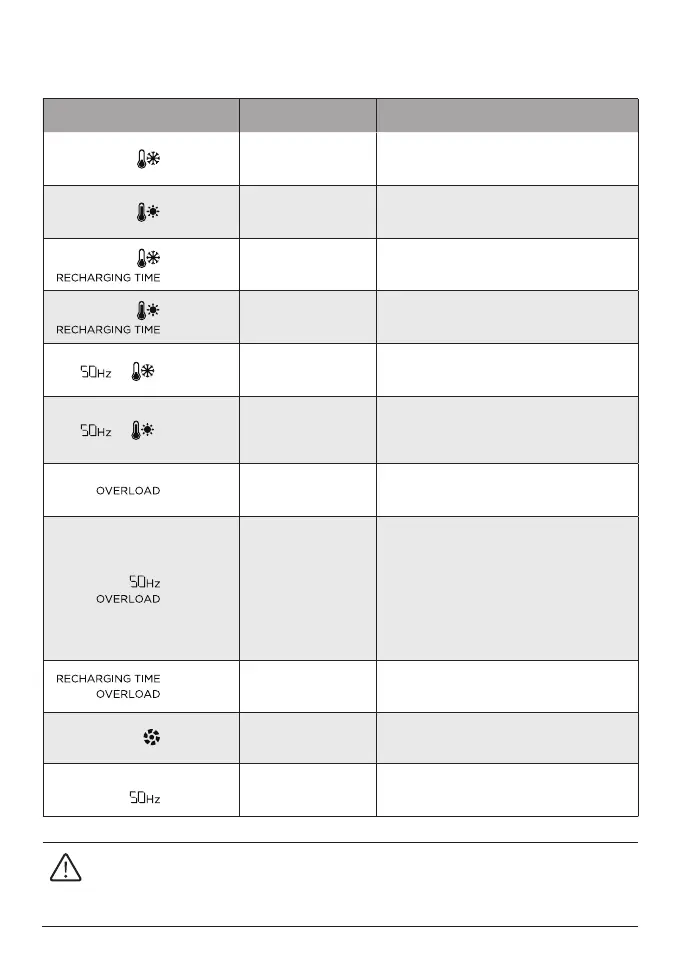
Indicator Problem Solution
Flashing
Battery discharge
low temperature
Normal operation will resume
automatically when the
battery warms up.
Flashing
Battery discharge
high temperature
Normal operation will resume
automatically after the
battery cools down.
Flashing
Battery charging
low temperature
Normal operation will resume
automatically after the battery temperature
is restored to above 3°C.
Flashing
Battery charging
high temperature
Normal operation will resume
automatically after the
battery cools down.
Flashing
AC output
low temperature
Normal operation will resume
automatically when the
product warms up.
Flashing
AC output
high temperature
Ensure that the air inlet and outlet of
the product are unobstructed. Normal
operation will resume automatically after
the temperature decreases.
Flashing
USB-C or car
charging output
overload
Disconnect overloading devices and
restart the product to resume
normal operation.
Flashing AC output overload
Disconnect overloading devices
and restart the product to
resume normal operation.
The sum power of loaded electrical
appliances must not exceed the rated
power (for the power limit of electrical
appliances in X-Boost mode,
please refer to the X-Boost
feature introduction).
Flashing Charging overload
Remove the charging cable and
normal operation will resume
automatically after restart.
Flashing Fan blocked
Check whether the fan is blocked
by foreign objects.
Flashing
Communication failure
between main
control board and AC
Normal operation will resume
automatically after restart.
If a warning appears during the use of the product and the warning icon persists after
restart, please stop using the product immediately (do not attempt to charge or discharge
it). For problems not covered in the preceding table, please consult EcoFlow customer
service.


 To Next Page