54
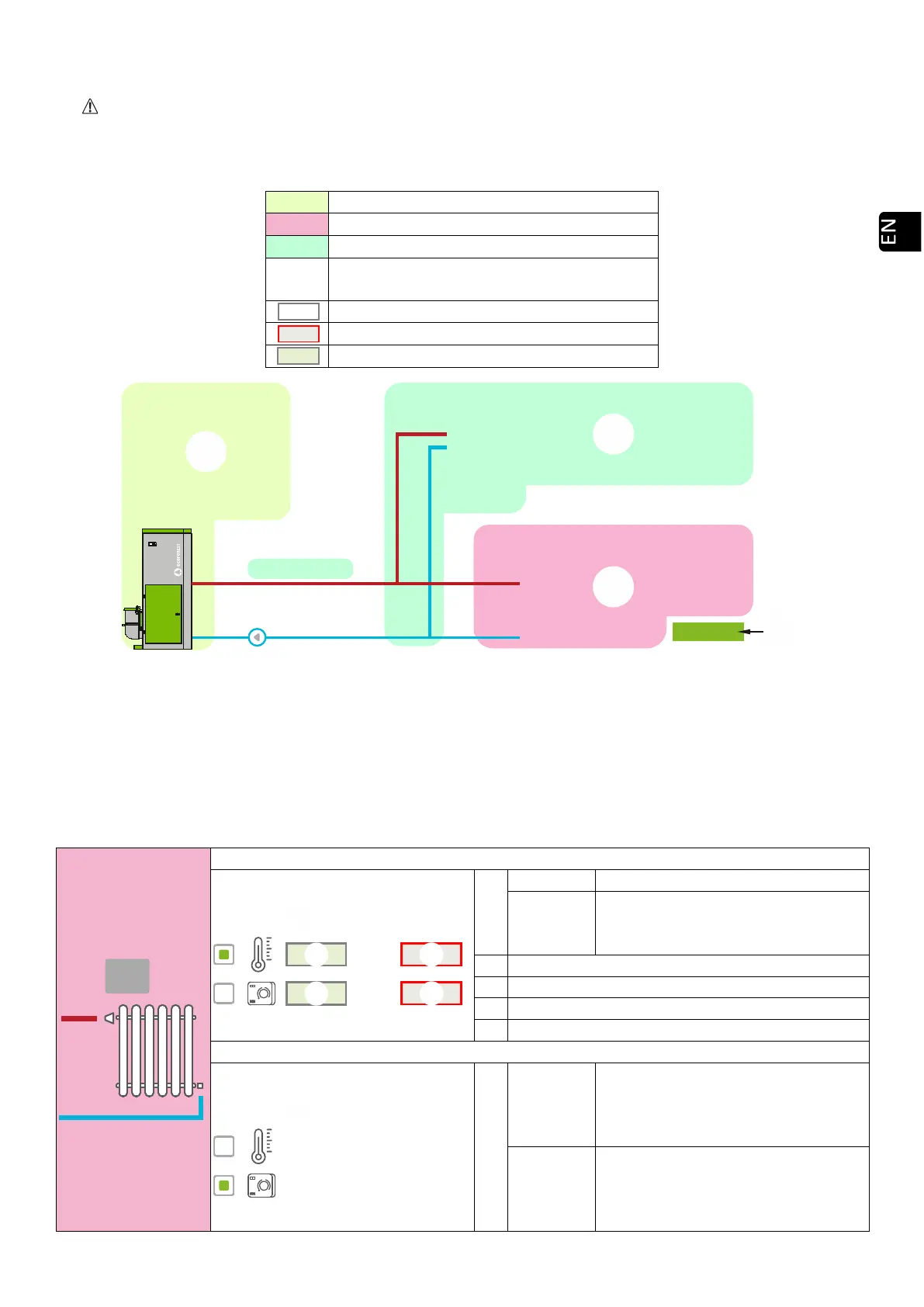
5.8. WEB VISUALIZATION OF HYDRAULIC SCHEME (WATER MODELS ONLY).
The configuration of the hydraulic scheme must be carried out by an installer or heating professional from
point 5.5.2. The scheme display can be divided into 3 superimposed blocks depending on the configuration.
Display menu. The user can only make minor modifications to some of the schemes (maximum DHW demand,
setpoint of room temperature).
Drawing 48
BOILER
The real-time data of the boiler are displayed, in addition to the drive setpoints to be satisfied.
HEATING
SINGLE ZONE
Regulates power to minimum.
Turn off /
Turn on
Regulates power to a minimum and
turns the machine on or off by room
temperature.
Maximum room temperature (Switch off)
Minimum room temperature.
Minimum
The machine will work at the selected
power level with closed contact
(demand) and at minimum with open
contact (no demand).
Turn off /
Turn on
It will turn on the machine or switch it
to standby if the contact is closed
(demand) or open (no demand)
respectively.
Modification of demands in hydraulic
scheme. (Exclusive use of technician).
User modifiable setpoint.
Setpoint can be modified by technician.



 To Next Page