12EN
2
Preparation
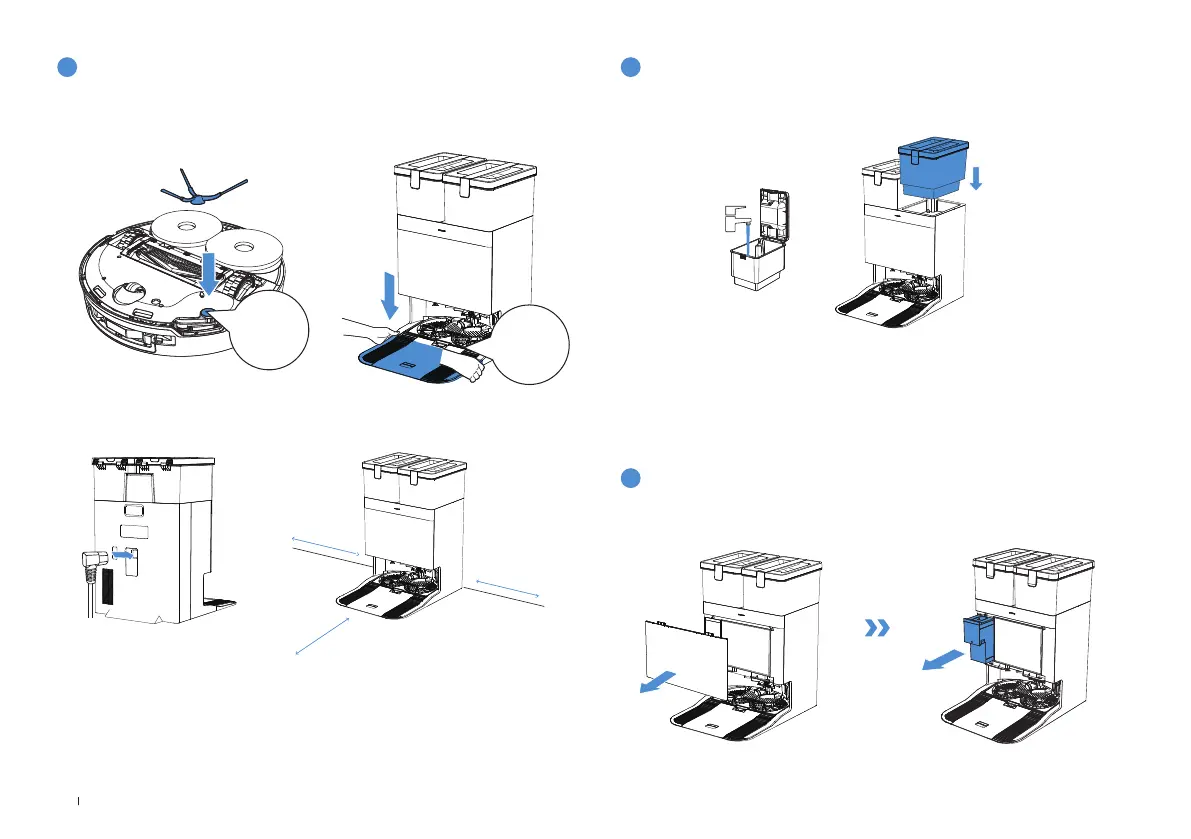
2. Assemble and Place the Station
Keep the area around the Station clear of objects, especially objects with reective surfaces.
≥
0.05m (0.16’)
≥
0.05m (0.16’)
≥
0.8m (2.62’)
Before using DEEBOT, please remove all protective materials.
The sound of Click indicates proper installation.
1.Installation
Click
Click
Note:
• If there are reflective objects such as mirrors and reflective skirting lines near the Station, the bottom 14
cm of that should be covered.
• Do not place the Station under direct sunlight.
• It is recommended to place the Station on the hard floor to experience complete functions of the robot.
• Place Station in a location with a strong Wi-Fi signal.
Take out the clean water tank, open the top cover of the water tank and add water
to the highest water level of the clean water tank. After adding water, close the
top cover of the water tank and put the clean water tank back to the base station.
3
Add Water In The Tank
Note:
• If there is residual water stain on the outside of the water tank, please wipe it clean with a soft
dry cloth before putting it back for use.
• Please add the cleaning liquid to the cleaning liquid box. If it is added to the water tank, the
cleaning liquid concentration may be too high, affecting normal use.
• Before use, please make sure to lock the top cover of the clean water tank and the sewage
tank to avoid affecting the normal use of the product.
• The water stains in the water tank are left over from the factory test, please feel free to use it.
1. Remove the dust bin cover, insert your ngers into the handle at the bottom of the cleaning
liquid box, pull out the entire cleaning liquid box, and place it on a hard, level surface.
4
Add Cleaning Solution


 To Previous Page