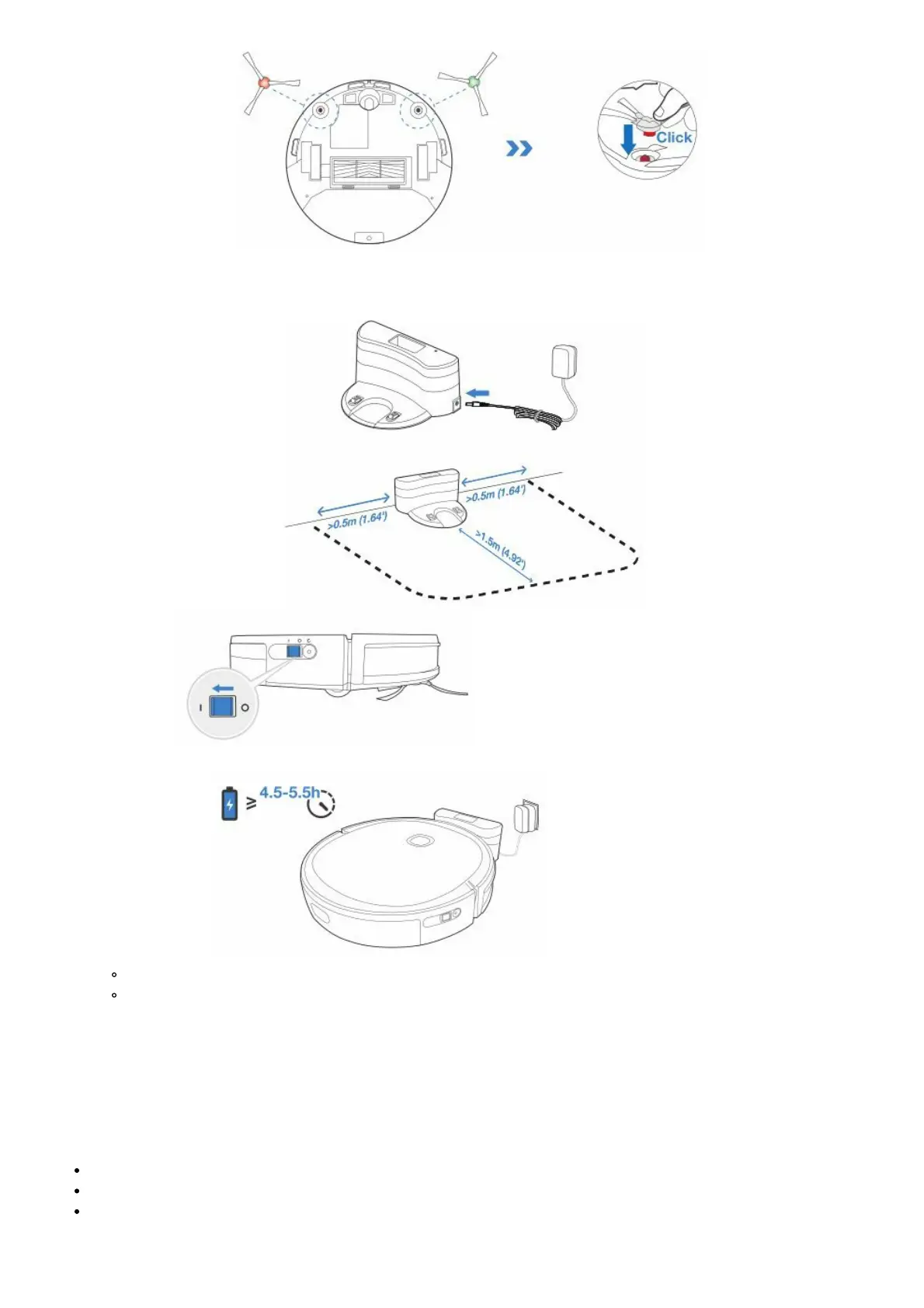
2. Install Side Brushes
Charging DEEBOT
1. Docking Station Placement
2. Power ON Note: I = ON, O = OFF
DEEBOT cannot be charged when being powered OFF.
3. Charge DEEBOT
Empty the reservoir and remove the Cleaning Cloth Plate before charging DEEBOT.
It is suggested to avoid picking up or moving DEEBOT during the cleaning for DEEBOT to return to
charge successfully.
ECOVACS HOME App
To enjoy all available features, it is recommended to control your DEEBOT via the ECOVACS HOME app.
Before you start, make sure that:
Your mobile phone is connected to a Wi-Fi network.
The 2.4GHz band wireless signal is enabled on your router.
The Wi-Fi indicator light on DEEBOT is slowly flashing.














 To Next Page