14
EN
3
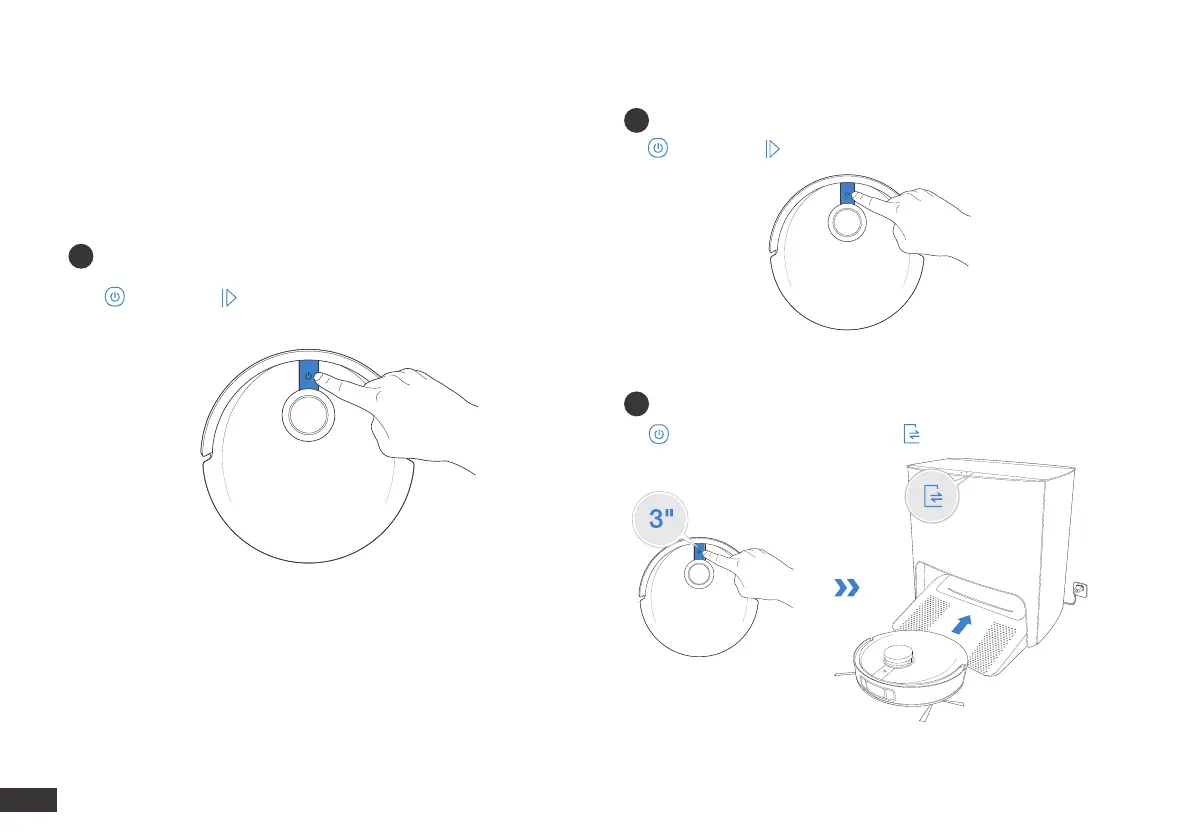
Back to the Station
2
Pause/Wake Up
Note: The indicator light will go out after the robot is paused for a few minutes.
Press the AUTO Mode Button on DEEBOT to wake up the robot.
Note:
1. For the rst-time cleaning, please ensure that DEEBOT is fully charged.
2. It is not recommended to assemble Mopping Pads Plates for the rst time
cleaning.
Note: When DEEBOT is not working, it is recommended to keep it switched ON
and charging.
Tap on DEEBOT or on the Clean Station to pause.
Tap
for 3 seconds to end current task. Tap to recall DEEBOT back to the
Clean Station.
1
Start
When creating a map for the first time, please follow DEEBOT to help
eliminate some minor issues.
For example, DEEBOT may get stuck in the low furniture. Please refer to
the following solutions:
① Raise the furniture if possible;
② Cover the bottom of the furniture;
③ Set up Virtual Boundary via the App.
Operating DEEBOT
Press on DEEBOT or on the Clean Station to start













 To Next Page