20
EN
3. Operating WINBOT
Note: Use a dry cloth to wipe away any marks the robot has left behind
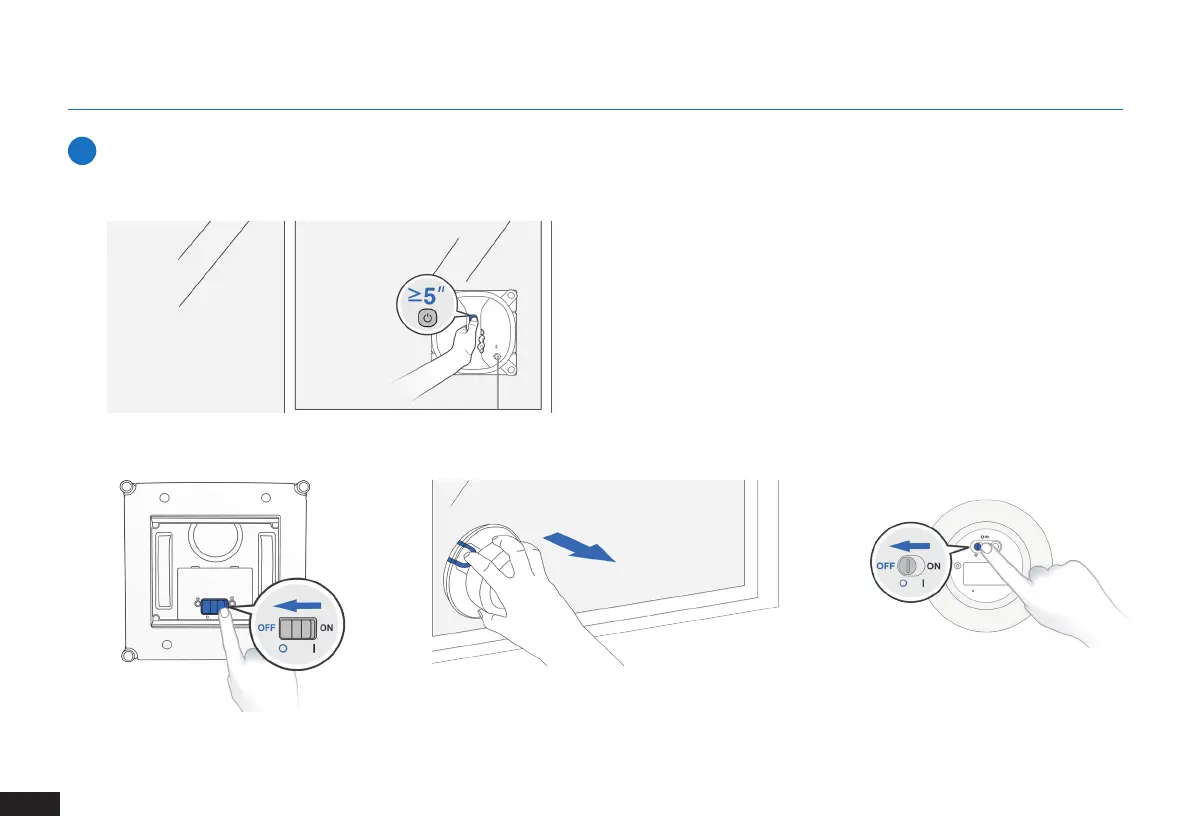
on the glass. If you want to stop the WINBOT during cleaning, rst
press the START/PAUSE Button once to pause WINBOT, and then hold
WINBOT FIRMLY while pressing and holding this button for more than
5 seconds to remove WINBOT.
When WINBOT completes its cleaning cycle, it returns to the place where it started and plays a tune.
9
Stop (Finish Cleaning)
1
Step
2
Step
3
Step
Note: If WINBOT has a problem and the WINBOT Status Indicator Light glows a continuous RED, it can be reset by pressing the RESET Button on the
Remote Control. See Section 6. Troubleshooting for details.
4
Step





 To Next Page