16
ECOWATER
S Y S T E M S
Troubleshooting (continued)
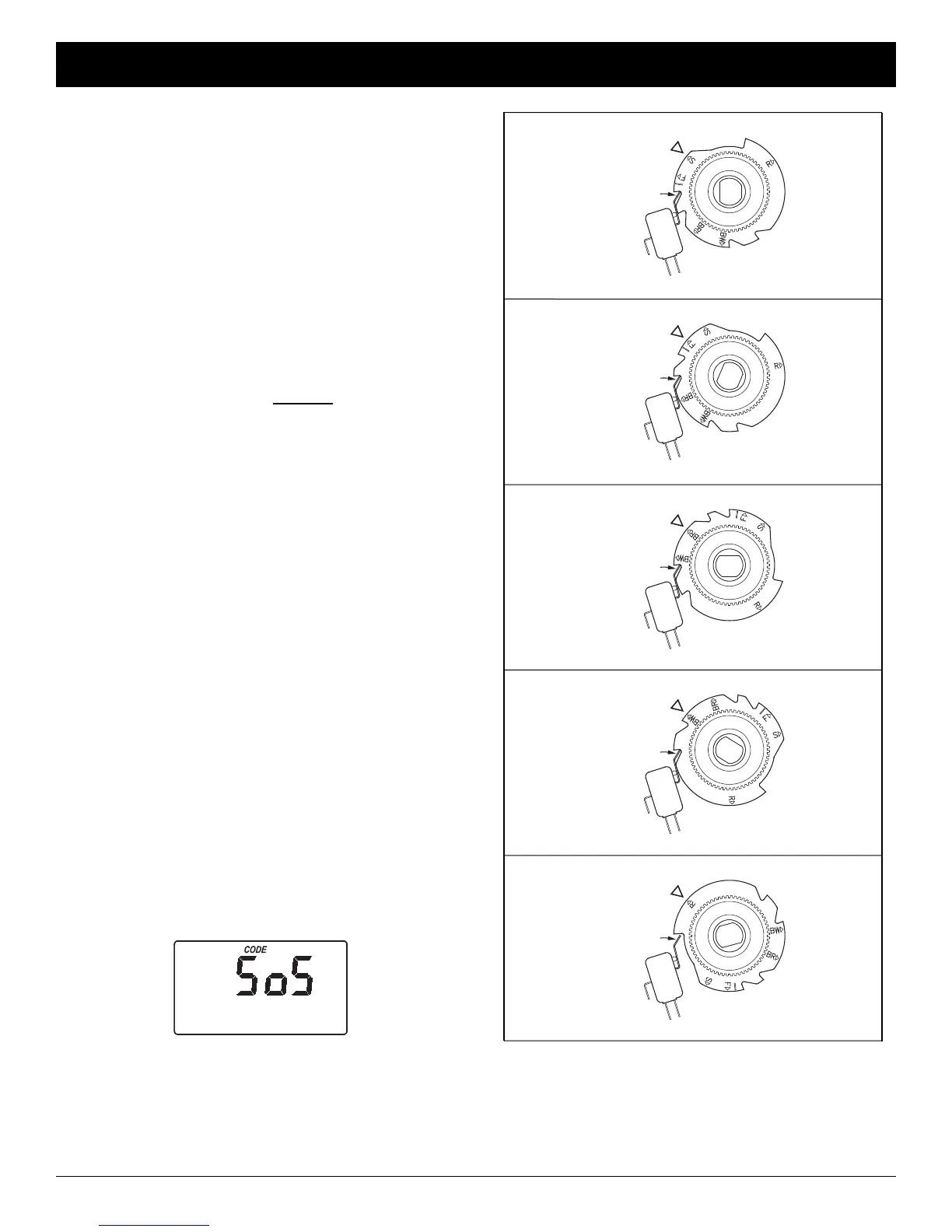
Valve Cam
FIG. 31
Position Switch
S
SERVICE
Valve Cam
FIG. 32
BR
FILL
F
BRINING
Position Switch
Valve Cam
FIG. 33
Position Switch
Valve Cam
FIG. 34
BW
BACKWASH
FAST RINSE
Position Switch
Valve Cam
FIG. 35
Position Switch
R
FIG. 30
3. Press the SELECT button, and the electronic con-
troller will restart.
4. Set the present time, days between recharges,
etc., as described on pages 10 & 11.
continued from previous page
4. While in this diagnostic screen, the following infor-
mation is available and may be beneficial for vari-
ous reasons. This information is retained by the
computer from the first time electrical power is
applied to the electronic controller.
a. Press the
á UP button to display the number of
days this electronic control has had electrical
power applied.
b. Press the â DOWN button to display the num-
ber of automatic or manual recharges initiated
by this electronic control since the model code
number was entered.
5. Press the SELECT button and hold
in for 3 sec-
onds until the model code shows in the display.
The model code should be “EC25” for Model EEC
1502R25 or “EC40” for Model EEC 1502R40. If the
wrong number shows, the softener will operate on
incorrect configuration data.
6. To change the code number - Press the
á UP or
â DOWN button until the correct code shows.
7. To return to the present time display, press the
SELECT button. If the model code was
changed, make all controller settings.
NOTE: If the electronic control is left in a diagnostic
display (or a flashing display when setting
times or hardness), present time automatically
returns if a button is not pressed within 4 min-
utes.
RESETTING TO FACTORY DEFAULTS
To reset the electronic controller to its factory default
for all settings (time, days between recharges, etc.):
1. Press the SELECT button and hold it until the dis-
play changes twice to show “CODE” and the flash-
ing model code.
2. Press the
á UP button (a few times, if necessary)
to display a flashing “SoS”.



 To Next Page