33
SETTING RECHARGE TIME
W
hen the conditioner/refiner’s electronic control is first
powered up, the default time for starting an automatic
recharge is 2:00 a.m. This is a good time in most
households because water is not being used. To
change this time:
1. From any of the rolling status screens, press the
SELECT (¡) button to display the Main menu.
2. Press the DOWN (6) button to scroll through the
menu options until Basic settings is highlighted
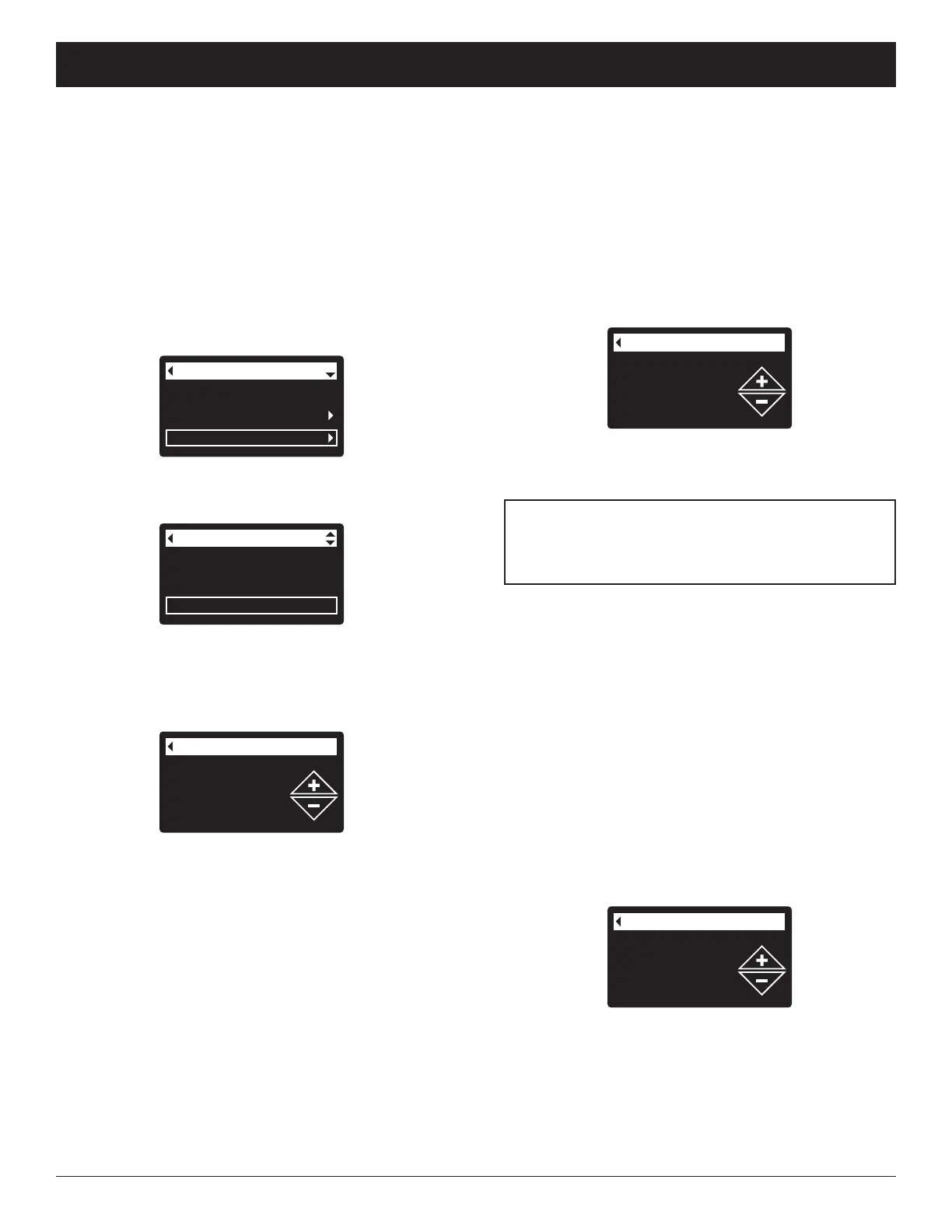
(See Figure 101).
Hardness
Iron level
Recharge time
Basic settings
FIG. 102
3. Press the SELECT (¡) button to display the Basic
settings menu (See Figure 102).
FIG. 103
Recharge
Salt settings
Basic settings
Main menu
FIG. 101
4. Press the DOWN (6) button to scroll through the
menu options until Recharge time is highlighted.
5. Press the SELECT (¡) button to display the
Recharge time screen (See Figure 103).
6. Press the UP (5) or DOWN (6) buttons to change
the recharge time in 1 hour increments. Hold the
button down to rapidly advance. Be sure that AM or
PM is correct (unless conditioner/refiner is set for a
24-hour clock).
7. Press the SELECT (¡) button. The display will go
back to the Basic settings menu (Figure 102).
8. Press the LEFT (3) button twice to return to the
rolling status screens.
7. Press the SELECT (¡) button. The display will go
back to the Basic settings menu.
8. Press the LEFT (3) button twice to return to the
rolling status screens.
SETTING IRON LEVEL
When the conditioner/refiner’s electronic control is first
powered up, a “wizard” screen prompts you to enter your
water’s iron level (See Pages 13-15 or 17). The conver-
sion is 3 grains per ppm of clear water iron. To change:
1-3. Go to the Basic settings menu by following Steps
1-3 in “Setting Recharge Time” at left.
4. Press the DOWN (6) button to scroll through the
menu options until Iron level is highlighted.
5. Press the SELECT (¡) button to display the Iron
level screen (See Figure 105).
FIG. 105
6. Press the UP (5) or DOWN (6) buttons to set the
value for iron in your water. Hold the button down to
rapidly advance.
7. Press the SELECT (¡) button. The display will go
back to the Basic settings menu.
8. Press the LEFT (3) button twice to return to the
rolling status screens.
SETTING HARDNESS
W
hen the conditioner/refiner’s electronic control is first
powered up, a “wizard” screen prompts you to enter your
water’s hardness (See Pages 13-15 or 17). To change it:
1
-3. Go to the Basic settings menu by following Steps
1-3 in “Setting Recharge Time” at left.
4. Press the DOWN (6) button to scroll through the
menu options until Hardness is highlighted.
5. Press the SELECT (¡) button to display the
Hardness screen (See Figure 104).
FIG. 104
ECOWATER
S Y S T E M S
Conditioner/Refiner Operation
NOTE: Do not increase the hardness setting to
compensate for iron in your water. The
electronic control compensates automatically
after you set the iron level, below.
6. Press the UP (5) or DOWN (6) buttons to set the
value for your water’s hardness. Hold the button
down to rapidly advance.



 To Next Page