ECTACO iTRAVL User Manual
8
The scroll bar is shown when the contents don't all fit on the
screen. The slider shows the position of the displayed contents
relative to the rest of data.
On the scroll bar:
• tap a scroll arrow
or to advance or go back one line;
• tap and drag the slider to browse information;
• tap the scroll bar below or above the slider to jump to the
corresponding portion of text.
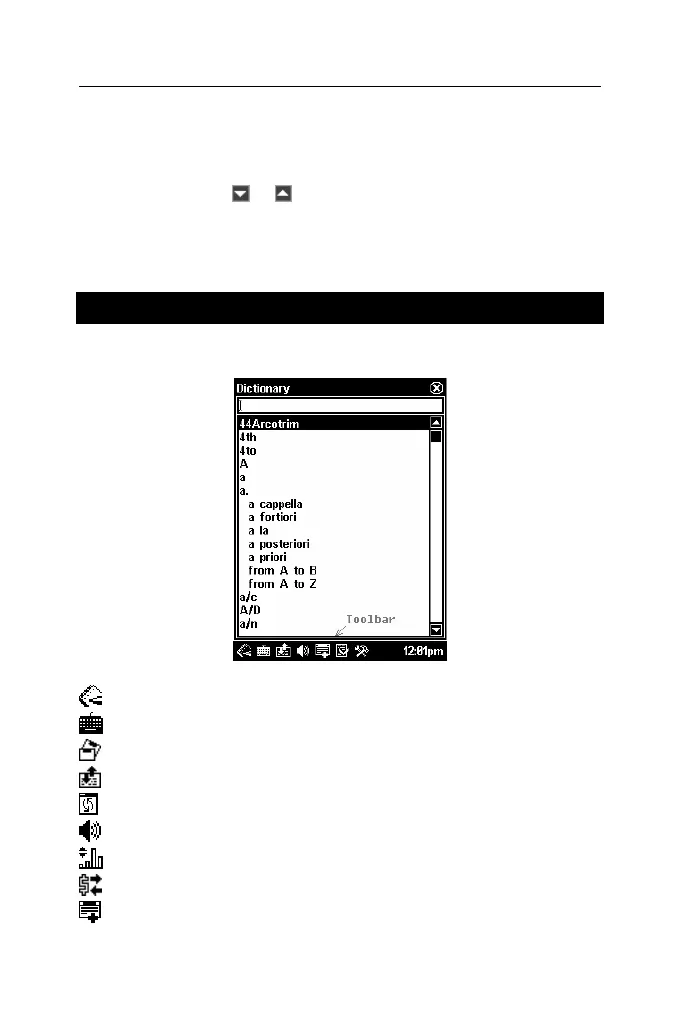
Toolbar
A toolbar is a set of horizontally arranged buttons shown at the
bottom of the pertaining window.
Toolbar buttons have the following functions:
Show Main Menu
Invoke on-screen keyboard
Display the List of sets
Switch translation direction
Reset statistics
Use speech function
Switch to metric conversion
Switch to currency conversion
Add entry to User's Dictionary or Flash Cards



 To Next Page