HD-KL18-0623
Page 12
Arbor Shaft
Figure 5
Blade Cap
retaining Nut
Blade Retaining
Cap
Backing Plate
Drive Pin
Drive Pin Hole
Internal tooth
Lock Washer
Changing Blades
Disconnect the machine from the power source before performing any work on the equipment (i.e. changing the
blade). To disconnect the power source on gasoline engine models, remove the spark plug lead. On electric models,
unplug the electrical power cord at the machine.
• Make sure you have the proper blade for the job. Determine the hardness and composition of the slab. Give your dealer
complete information including whether re-bars are present, the desired depth of the cut, and length of the cut. If in doubt,
contact the blade manufacturer.
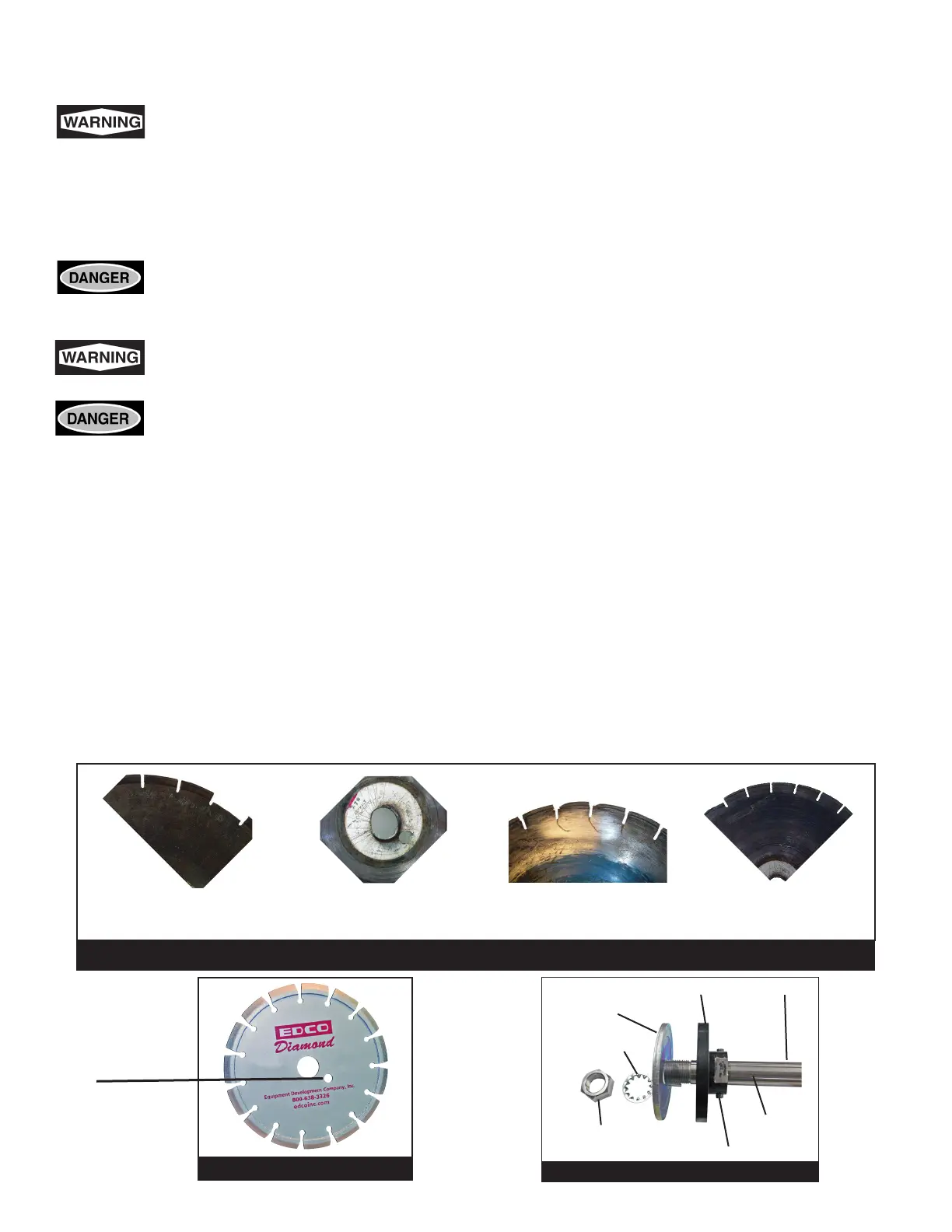
Inspect the blades before installing. Check diamond blades for cracks, loose segments and oversize, worn, or
out-of-round arbor holes (See below). Do not use any questionable blade since serious personal injury and/or
damage to property can result. Do not use warped, twisted, or out-of-balance blades. Unbalanced blades will
wear excessively, vibrate and damage both arbor shaft and bearings. Do not use blade without a drive pinhole
(Figure 4).
For safety reasons, EDCO does not recommend the use of any abrasive blades. Abrasive blades can break
and cause serious personal injury to operator and/or bystanders. If abrasive blades are used by choice, use
only reinforced abrasive blades. Inspect blades carefully.
Never exceed the maximum operating speed of the blade. Be sure to match the blade speed rating with the
arbor shaft speed on the machine. The KL-18 has an arbor shaft speed (unloaded) of 3000 RPM.
• Do not remove or lift the blade guard unless machine is stopped and all power is disconnected. Be sure to reinstall blade
guard before reconnecting the power source.
• Be sure the arbor shaft, backing plate, and blade cap are clean and in good condition. Make sure the threads are clean and
undamaged. If any damage is detected, consult your EDCO dealer (or the EDCO factory).
• The backing plate and blade cap (Figure 5) should be the same diameter, do not use if they are dierent diameters. For
abrasive blades and for all steel centered diamond blades, the backing plate and blade cap must be at least 1/4 the
diameter of the blade.
• The drive pin should be tight in the blade cap and long enough to t through blade and into hole in backing plate.
• Place the blade on the arbor shaft and turn until the drive pinhole lines up with the backing plate.
• Place the blade cap on the arbor shaft so the drive pin goes through the holes in the blade and backing plate.
• Put washer and arbor shaft nut and tighten arbor shaft nut.
• Secure the blade guard in the operating position before reconnecting the power supply or starting engine.
Possible Diamond Blade Problems
Segment Loss:
Usually insucient water
Arbor Hole Out-of-Round:
Blade not properly tightened or
seated on arbor
Cracked Segments
and/or Core:
Wrong blade for the job
Blade Will Not Cut:
Blade is glazed or to
hard for the job
Drive Pin Hole
Figure 4


 To Next Page