7
► Description
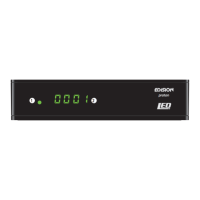
Front Panel
1
Infrared sensor for the reception
of remote control commands
2
Display LED, displays current information
Back Panel
3
LNB IN: Connection for the coaxial cable
to the signal from the satellite system
4
S/PDIF: Audio interface
for amplier/audio console
5
HDMI: Connection to an HDTV
quality TV
6
SCART: For connecting to a TV set,
using SCART cable [not for HD TV]
7
Connection for an adapter (DC 12V/1,0A)
Subpage
8
/USB: Connection for USB storage devices
Connecting and switching on
Note: For interference-free reception via satellite,
a specialist must
calibrate your satellite system with a
digital TV level measuring set.
•
Connect the receiver with the HDMI cable
via the HDMI interface with your TV set.
•
Now connect the receiver via the
LNB IN input with the satellite
antenna cable.
•
Insert the batteries into the remote
control. Notes on the remote control
can be found on
the back of these instructions.
•
Connect the receiver to the power supply.
•
The receiver starts with the BOOT process
and is ready for operation in no time.
proton
1 2
8
HDMI SCART
DC 12V/1,0 A
S/PDIF
LNB IN 13/18V
400mA MAX
3 4
5
6
7
HDMI SCART
DC 12V/1,0 A
S/PDIF
LNB IN 13/18V
400mA MAX
1
HDMI in
2
HD m i
kabel
HDMI
kabel
Power socket
HDMI: Output receiver
HDMI cable
TV set connection panel
Use an HDMI input!
LNB IN:
Connecting
the cable to the satellite
signal
coaxial-wire Antenna


 To Next Page