9
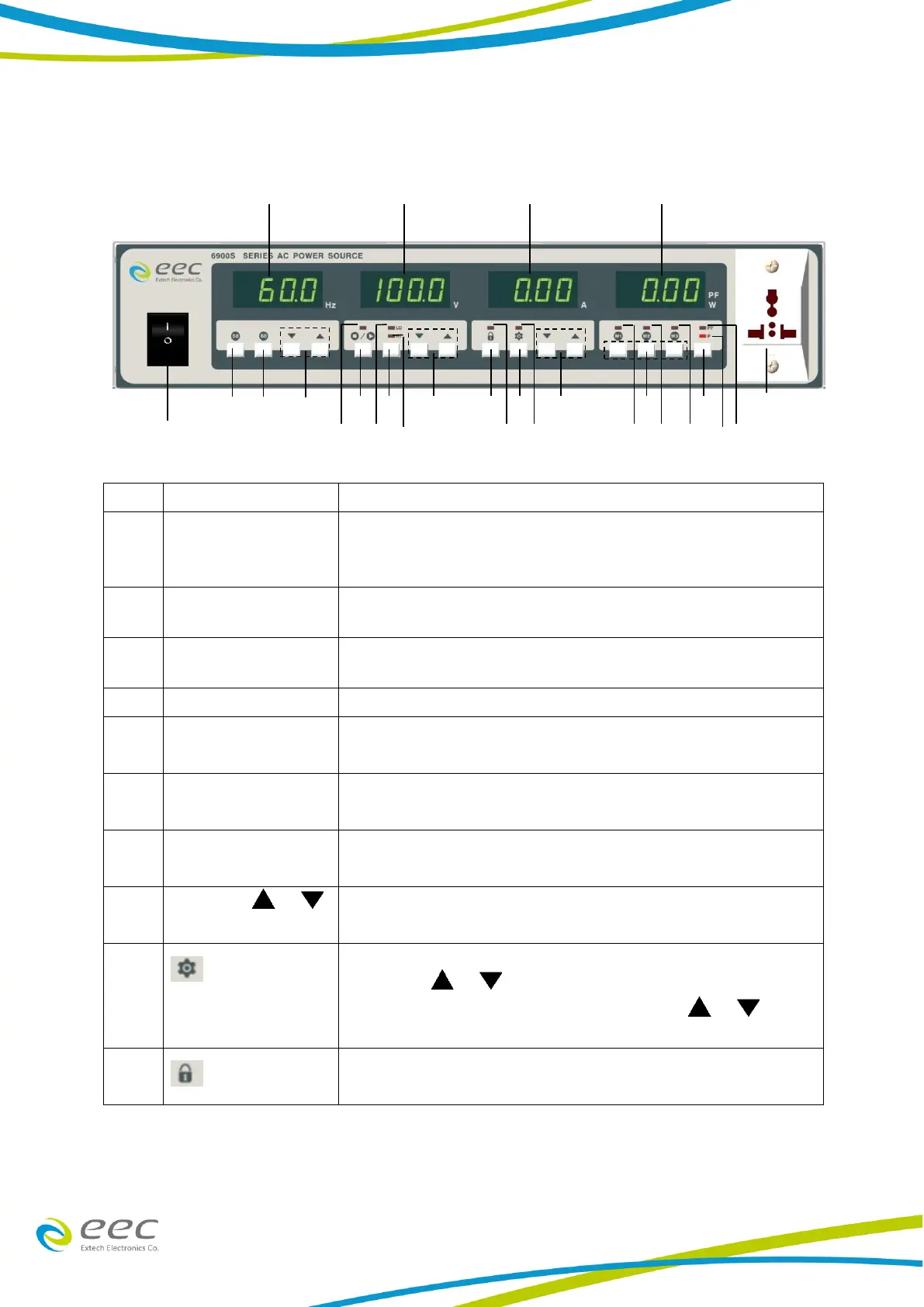
3.2 Front Panel Description
It will display the output frequency. When the output is OFF,
it shows the frequency setting. Otherwise, it shows the
frequency of the output.
When the output is OFF it shows the output voltage setting.
Otherwise it shows the voltage of the output.
When the output is OFF it shows the output current setting.
Otherwise it shows the current of the output.
Display the value of output wattage or power factor
UNIVERSAL AC
OUTPUT SOCKET
Select the display of output wattage or power factor value.
Store setting memories. [Press and hold for a second or
above].
To increase or reduce the output current higher than the
display value. Or be a selection key for System conditions.
Enter or exit from the setting of system parameter. You can
utilize the / keys under VOLTAGE meter to select
the parameter that you need to set, and the / keys
under CURRENT meter to set parameters.
To disable all the keys on the front panel. It switches between
Lock and Unlock.


 To Next Page