94
MV-2552-2553-2554-08-2022 eeese-aircare.com © All rights eeese air care aps
UK
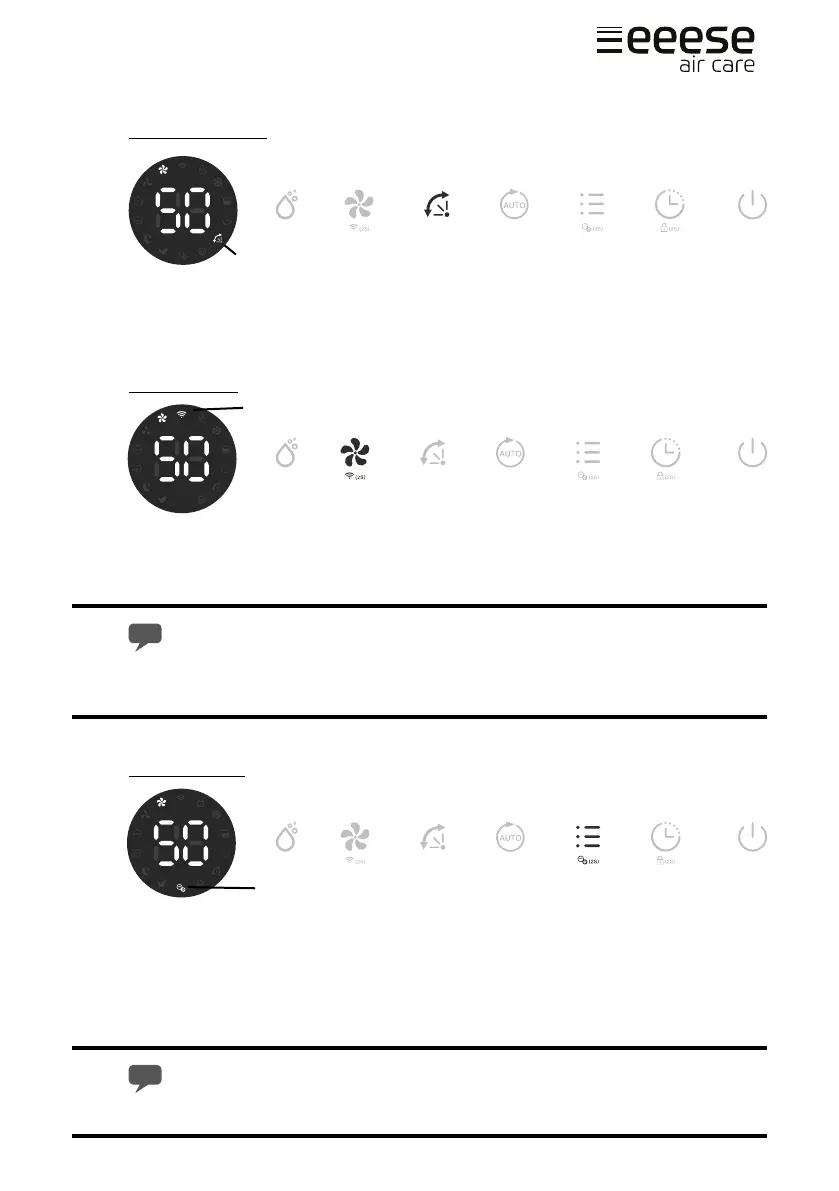
Oscillating Flaps
Press the Oscillation button (A). The oscillation indicator will be activated on the display
(B). The unit oscillates for better air circulation and optimal diusion of the dehumidied
air throughout the room.
WIFI Function
Press the Fan Speed button (A) for 2 seconds to activate the WIFI function and enter into
the distribution network mode. During the network conguration, the WIFI indicator (B)
ashes and after the WIFI is connected, the icon is on.
See below section Connection to WIFI for detalied settings.
Press the Fan Speed button for 2 seconds and you can disconnect to the WIFI.
Built in Ionizer
The ionizer creates negative ions that attach to positive charged molecules such as dust,
bacteria, pollen, smoke, and other allergens. These molecules attach to each other into
bigger molecules that cannot oat in the air and falls to the ground.
Press the Mode button (A) for 2 seconds to activate the ionizer function. The ionizer
indicator will show on the display once activated (B). Inactivate it by pressing the Mode
button for 2 seconds again. Note that the ionizer indicator disappears.
If the fan stops working, the ionizer function will automatically be deactivated.
B
A
B
A
A
B


 To Next Page