10
Drum Kit Edit
Menu
Drum Kit Edit
In this section, you can edit the drum kit.
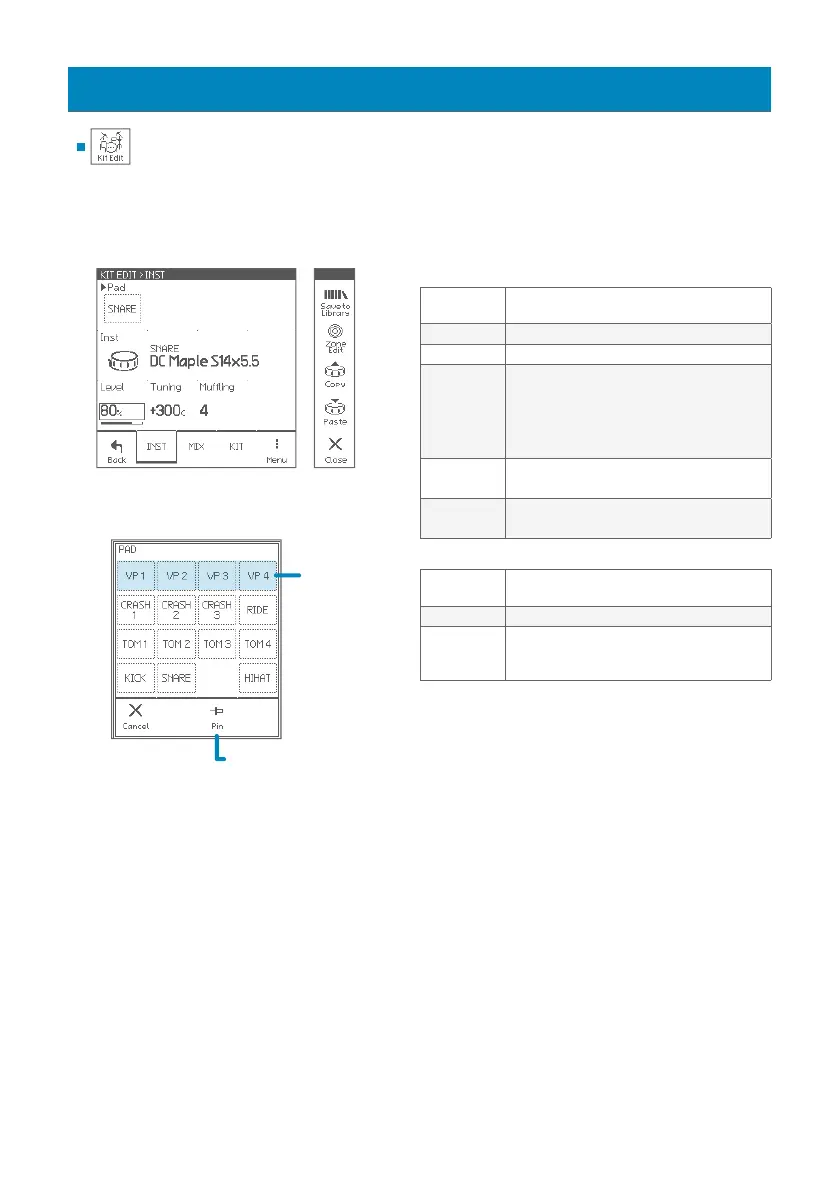
Parameters for each pad
Pad
Selects an edit target pad.
• Can be selected by hitting a pad.
Inst (icon) Selects Inst group
Inst (name) Selects Inst (sound for the pad)
Level
Adjusts pad level
* Clipping may occur when exceeding 85%.
* Adjusts all zones together
• You can also adjust pad levels with faders in
the Pad Levels screen (p. 14).
Tuning
Adjusts pitch in cent
* Adjusts all zones together
Muing
Adjusts mute amount (sustain)
* Adjusts all zones together
Page Menu
Save To
Library
Saves current Inst settings to the Inst library
(p. 15).
Zone Edit Edits each zone (p. 12)
Copy/Paste
Copies/Pastes current pad (Inst) settings
When paste, the PASTE ITEMS window appear
to select paste items.
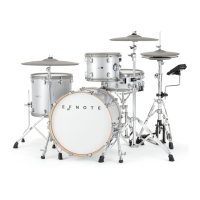
PAD window
When pinned, the selected
pad is not changed by
hitting a pad.
INST
VP (virtual pad)
can be played
by the layer
function
(p. 11).


 To Next Page