24
Settings
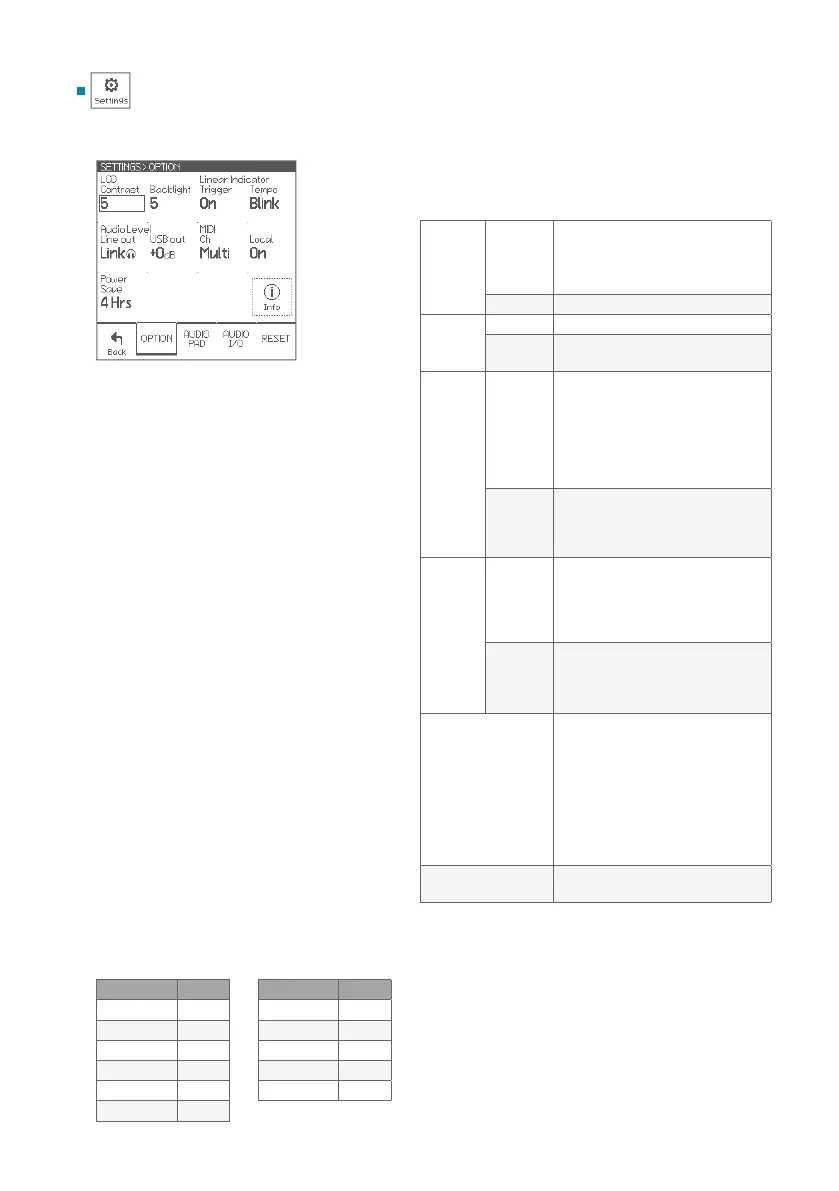
These parameters congure the system general
settings.
Parameters
LCD
Contrast
Adjusts the display contrast
* The LCD contrast is adjusted
automatically depending on the
surrounding temperature.
Backlight Adjusts display back light brightness
Linear
Indicator
Trigger On: The indicator displays strike force.
Tempo
Blink / Scan: When the click is on, the
indicator displays the beat.
Audio
Level
Line Out
The line out level can be congured
as xed level or variable level.
• 0dB: Maximum level
• -6dB: Applies a 6dB attenuator
• -12dB: Applies a 12dB attenuator
• Link: Line out level is linked to the
phones level setting
USB Out
Adjusts USB audio output level for
all channels
• 0dB: Normal level
• +6dB: Boosts 6dB
MIDI
Ch
Congures the MIDI channel for
send/receive
• Multi: Congures separate MIDI
channels for each pad. See the
“Multi MIDI channel“ table.
Local
This should be ON normally.
When O, internal connection
between the pad and the sound
generator is inactivated.
Power Save
Power save function will turn power
o automatically after specied
period has passed since it was last
played or operated.
You can specify this period of time,
or disable it.
• 30 min / 4 Hrs: Enables the power
save
• O: Disable the power save
Info
Displays the rmware version
information
* About the USB connection, see p. 27.
Settings
OPTION
Pad Ch
Kick 1
Snare 2
Tom 1 3
Tom 2 4
Tom 3 5
Tom 4 6
Pad Ch
HH 7
Crash 1 8
Crash 2 9
Crash 3 10
Ride 11
Multi MIDI channel
* Each channel setting is not changeable.


 To Next Page