12
Drum Kit Edit
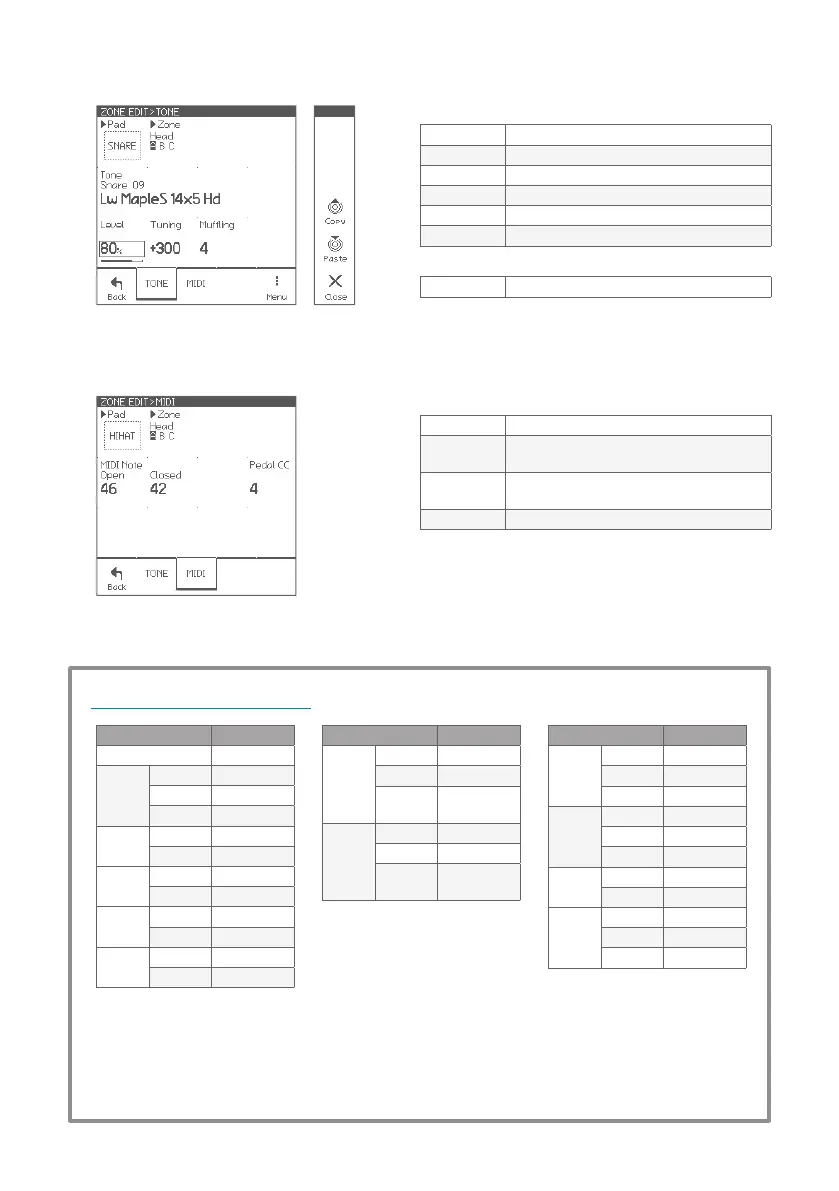
Parameters for each zone
Pad Selects edit target pad
Zone Selects edit target zone
Tone Selects tone (sound for a zone)
Level Adjusts zone level
Tuning Adjusts pitch in cent
Muing Adjusts mute amount (sustain)
Page Menu
Copy/Paste Copies/Pastes current zone (tone) settings
Parameters for each zone
MIDI Note Note number for current zone
Open
Note number for hi-hat open state on current
zone
Closed
Note number for hi-hat closed state on
current zone
Pedal CC Control change number for hi-hat pedal
* If the note numbers or the control change numbers are
changed, MIDI data previously recorded cannot be played
back correctly.
ZONE EDIT > TONE
ZONE EDIT > MIDI
Pad Note#
Kick 36
Snare
Head 38
Rim 40
Side-rim 37
Tom 1
Head 48
Rim 50
Tom 2
Head 45
Rim 47
Tom 3
Head 43
Rim 58
Tom 4
Head 41
Rim 39
Pad Note#
HH
Open
Bow 46*
Edge 26*
Pedal
Splash
44
(CC#4=0)
HH
Closed
Bow 42*
Edge 22*
Pedal
Close
44
(CC#4=127)
Pad Note#
Crash 1
Bow 49
Edge 55
Cup 54
Crash 2
Bow 57
Edge 52
Cup 56
Crash 3
Bow 27
Edge 28
Ride
Bow 51
Edge 59
Cup 53
About the MIDI messages
* The hi-hat pedal sends MIDI control change #4 with value in range from 0 (open) to 127 (tight closed), before the
corresponding note message.
* The cymbal choke technique sends the polyphonic after touch (key after touch) message.
* The EFNOTE 3/5 does not send/receive the Program Change messages.


 To Next Page