27.
1202
Control console. Basic operation
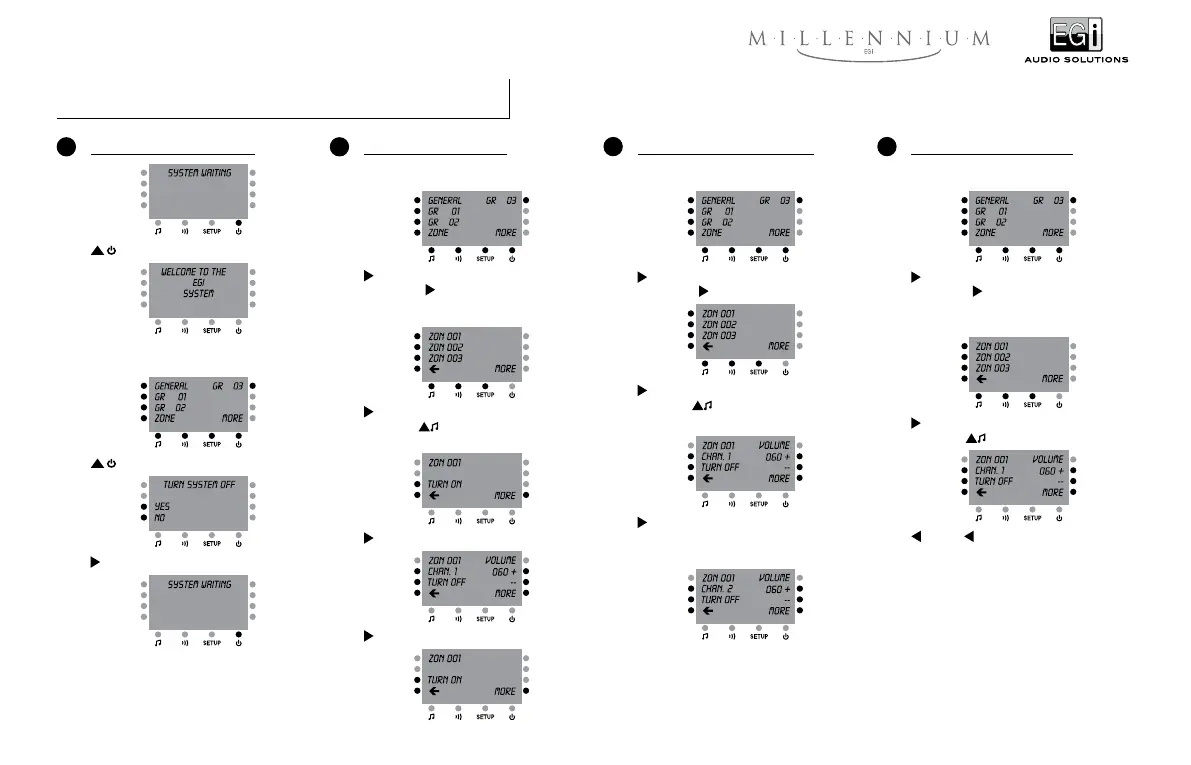
4 Altering the volume level of a zone
If three groups -for instance- have been previously
created:
GENERAL (And the sign “ < “ appears next to
GENERAL) +
ZONE
If three zones -for instance- have been previously
named:
ZON 001 (And the sign “ < “ appears next to
ZON 001) +
+ or – alters the volume level of the
previously selected zone.
3 Changing the audio channel in a zone
If three groups -for instance- have been previously
created:
GENERAL (And the sign “ < “ appears next to
GENERAL) +
ZONE
ZON 001 (And the sign “ < “ appears next to
ZON 001) +
If the zone was previously on:
CHAN. 1
Provided that at least 2 channels are available at
the system:
2 Turning a zone “On” and “Off”
If three groups -for instance- have been previously
created:
GENERAL (And the sign “ < “ appears next to
GENERAL) +
ZONE
If three zones -for instance- have been previously
named:
ZON 001 (And the sign “ < “ appears next to
ZON 001) +
If the zone was previously off:
TURN ON
TURN OFF
1 Turning the system “On” and “Off”
If three groups -for instance- have been previously
created:
YES


 To Next Page