
 Need help?
Do you have a question about the EGi MILLENIUM and is the answer not in the manual?
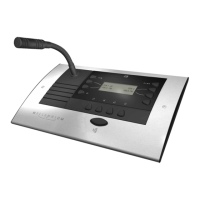
Function of the push button for initiating speech.
Button used to manage audio program playback.
Button for controlling voice message playback.
Button used for system configuration and settings.
Button to turn the control console on or off.
Buttons used for browsing through console menus.
Step-by-step guide to turn the sound system on and off.
Procedure to activate or deactivate individual zones.
How to switch audio channels within a zone.
Method for modifying the audio volume in a specific zone.
Managing the power state of zone groups in a channel.
Procedure to switch audio sources between AUX and internal radio.
Steps for tuning into radio frequencies.
How to initiate calls to zones not set to private mode.
Making calls when zones are in private mode.
Enabling or disabling the system-wide access password.
Procedure for inputting the general access password.
Process of assigning unique numerical identifiers to zones.
Assigning custom text names to zones for identification.
Steps to create and assign numbers to zone groups.
Assigning custom names to created groups.
Method for associating zones with specific groups.
Changing the visual order of groups on the console screen.
Procedure to delete a group from the system.
Setting the PA volume level for individual zones.
Enabling or disabling the private mode for a zone.
Setting the tone that precedes an announcement.
Choosing the language for the console interface.
Viewing the installed software version.
Procedure for resetting the system to its default state.
Setting the maximum broadcast time for telephone messages.
Linking telephone numbers to specific zones.
Linking telephone numbers to zone groups.
Managing password security for telephone messaging.
Scheduling messages to play at specific times.
Broadcasting messages based on system events.
Choosing where messages will be played.
How message playback interacts with zone private modes.
Setting repeat counts and intervals for messages.
Adjusting the playback volume of recorded messages.
Listening to messages before they are broadcast.
Step-by-step guide for recording audio messages.
Procedure to delete existing messages.
Adjusting the internal clock of the system.
The main digital processor and power unit for the system.
Module for inserting low-level audio signals.
Module for receiving FM radio broadcasts.
Module for storing and playing back recorded messages.
Module for connecting to telephone networks.
Module for IP network connectivity and communication.
Converter for connecting flat cable lines within a rack.
DC power supply for central equipment and modules.
Module to select and route audio signals.
Cover to fill unused rack spaces.
Power amplifier for two zones, each 120W.
Power amplifier for four zones, each 120W.
Power amplifier for one zone, 240W.
Power amplifier for two zones, each 240W.
Power amplifier for one zone, 480W.
Controls the power state of the 1204 control unit.
Adjusts the audio volume for the 1204 unit.
Selects the audio channel for the 1204 unit's zone.
Controls the power state of the 1203 intercom unit.
Button to initiate a call to zone 2.
Permanently selects zone 2 for communication.
Adjusts message broadcast volume for zone 1.
Adjusts message broadcast volume for zone 2.
Professional balanced microphone input connector.
Switch to set the connected microphone type.
Lamp indicating the power status of the unit.
Button to turn the microphone pre-amplifier on or off.
Lamp indicating if the pre-amplifier is active.
Control for adjusting microphone signal volume.
Lamp indicating when volume reaches maximum.
Button to turn the auxiliary input module on or off.
Lamp indicating module activation.
Control for adjusting the volume of the auxiliary input.
Lamp indicating when volume reaches maximum.
Connection for external audio devices like CD players.
Lamp indicating reception of an audio signal via RCA.
RJ45 port for connecting control consoles.
RCA port for connecting external audio sources.
Controls the power for the 1205 control unit.
Adjusts the audio volume for the 1205 unit.
Selects the audio channel for the 1205 unit's zone.
Controls the power for the digital amplifier.
Adjusts the volume of the connected digital amplifier.
Selects the audio channel for the 1206 unit's zone.
Controls the power for the 1207 control unit.
Adjusts the audio volume for the 1207 unit.
Selects the audio channel for the 1207 unit's zone.
 General
| Brand | EGi |
|---|---|
| Model | MILLENIUM |
| Category | Control Systems |
| Language | English |

 To Next Page