31.
1202
Control console. Advanced functions
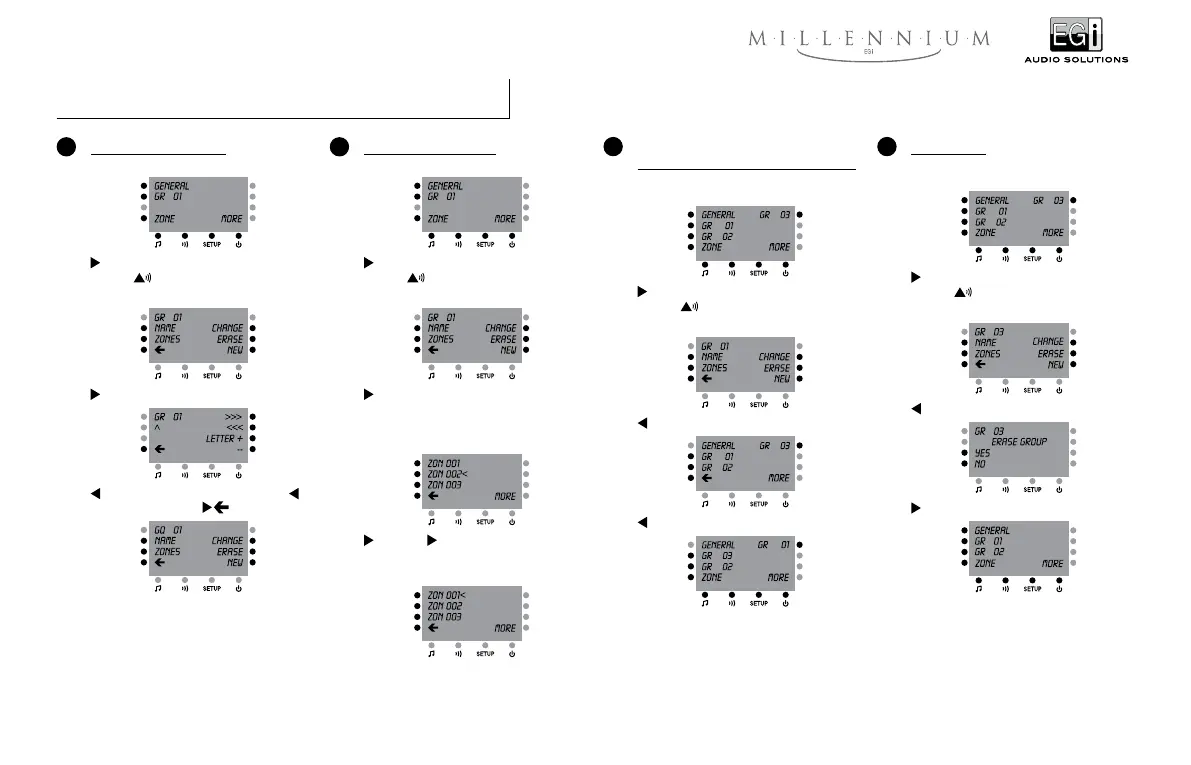
7 Erasing a group
If three groups -for instance- have been previously
created:
GR 03 (And then the sign “<” appears next to
GR 03) +
If the general access password is NOT active:
ERASE
YES
6 Changing the order of appearance of groups
in the screen
If three groups -for instance- have been previously
created:
GR 01 (And then the sign “<” appears next to
GR 01) +
If the general access password is NOT active:
CHANGE
GR 03
Now it is recommended to initialise the system
again (like in point number 13) so that the system
checks again the relationships between groups
and zones.
5 Assigning a zone to a group
If one group has already been created:
GR 01 (And then the sign “<” appears next to
GR 01) +
If the general access password is NOT active:
ZONES
Provided that there are 3 numbered zones in the
system and zone number 2 belongs to group
number 1.
ZON 001 + ZON 002
Now zone number 1 belongs to group number 1
and zone number 2 does not.
4 Labelling groups with names
If one group has already been created:
GR 01 (And then the sign “<” appears next to
GR 01) +
If the general access password is NOT active:
NAME
>>> (The cursor is placed in letter “R”) + –
(“R” is replaced by “Q”) +
If the general access password is active the system will require us to introduce it every time we try to operate one of
the advanced functions (see point 2 of “Access restrictions”).



 To Next Page