56V RAPID CHARGER — CH5500/CH5500-FC14
OPERATION
HOW TO CHARGE THE BATTERY PACK
WARNING:
Do not use the charger outdoors or expose it to wet or damp
conditions. Water entering the charger will increase the risk of electric shock.
NOTICE: Lithium-Ion battery packs are shipped partially charged. Before using it the
first time, fully charge the battery pack.
1. Connect the charger to the power supply (120V~,
60Hz). The four charging indication LEDs will
briefly shine green, indicating that the charger is
working correctly.
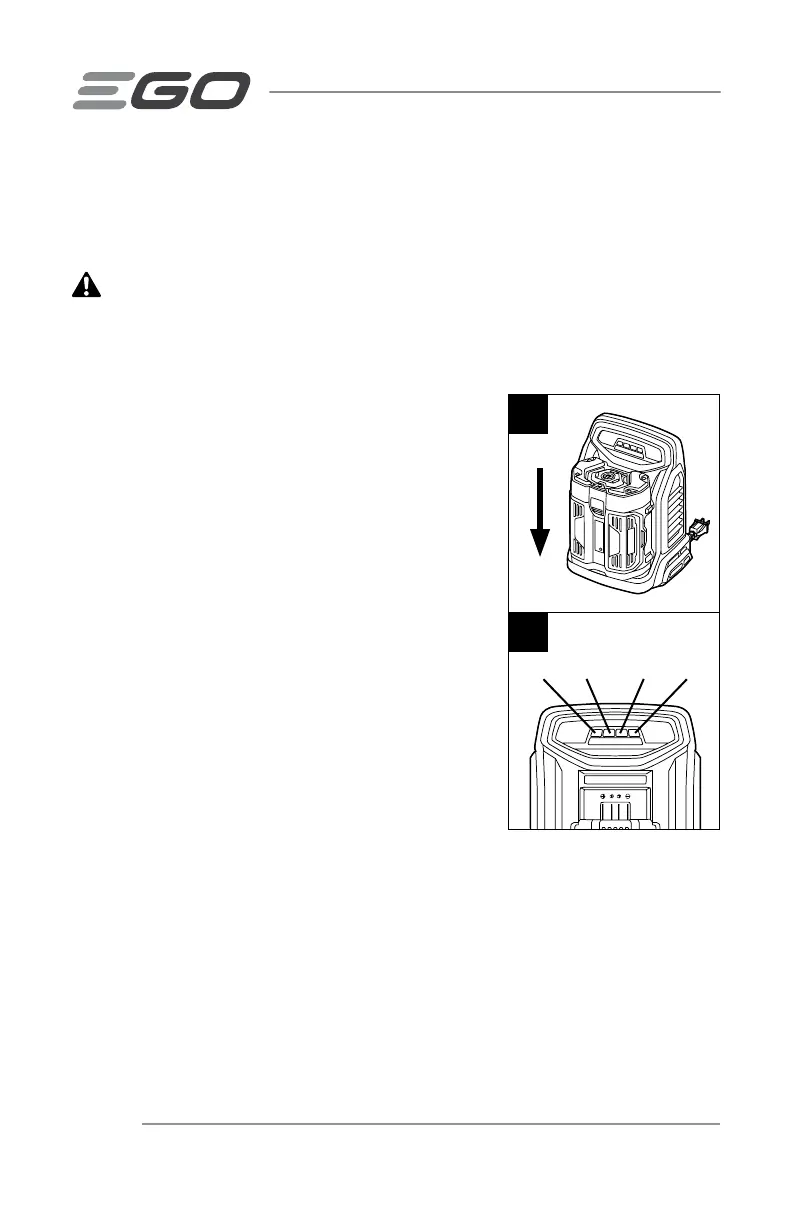
2. Align the raised ribs of the battery pack with the
mounting slots in the charger; slide the battery
pack down onto the charger (Fig. 2).
3. The charger will communicate with the battery
pack to evaluate the condition of the battery pack.
4. When the battery pack is charging, the four
charging indication LEDs on the charger will
shine green in sequence, from left to right, to
indicate the charge level; please refer to Fig. 3.
The power indicator on the battery pack will flash
in sequence: red, orange and green (BA1400,
BA1400-FC, BA2800, BA2800-FC, BA4200 and
BA4200-FC). The last segment of 5-LED indicator
on the battery pack will flash green (For BA1400T,
BA1400T-FC, BA2242T, BA2242T-FC, BA2800T,
BA2800T-FC, BA3360T, BA3360T-FC, BA4200T,
BA4200T-FC, BA4480T, BA4480T-FC, BA5600T,
BA5600T-FC, BA6720T and BA6720T-FC). The fan in the charger continuously
works to cool the battery pack.
5. When the battery pack is fully charged, the charging indication LEDs stop
alternating and will shine green continuously. The power indicator on the battery
pack will go out. Wait until the cooling fan stops, remove the battery pack from
the charger and disconnect the charger from the power supply.
2
LED 1 LED 2 LED 3 LED 4
3


 To Next Page
 Loading...