Media Loan The Library Group (360) 867-6253
The Evergreen State College Olympia, WA 98505
http://www.evergreen.edu/media
Operating Guide for
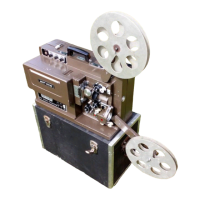
Eiki 16mm Projector
Recycled & Recyclable
Eiki16mmProjector/11/11/02lc
Open the latch on the front of the projector to remove the
side cover. Raise both REEL ARMS (2 & 13) until they
click. Make sure the FUNCTION LEVER (16) is in the
STOP position, then connect the AC power cord into a
standard wall outlet. (DO NOT REMOVE THE GROUND
PLUG!) A green lamp located beneath the lens will light up.
Before you thread the film, you can pre-focus and adjust the
size of your picture by turning the function lever to the first
forward lamp position. Move the projector back from the
screen to enlarge the picture and closer to the screen to
make the picture smaller. Raise and lower the picture by
using the black ELEVATING KNOB (12) on the front of the
projector. When the picture is correctly sized and
positioned, adjust the FOCUS (5) knob until the edge of the
light is sharp. Turn the FUNCTION LEVER (16) to stop.
Place the film to be shown on the SUPPLY REEL ARM (2).
It should feed off in a clockwise direction; the leader of the
film will usually be green. Place a take up reel on the other
reel arm making sure its the same size or larger than the
supply wheel.
Lock down both reels by pushing down the small ARM
LOCK BUTTONS (1 & 14) on the reel arms.
THREADING
Insert the leader of the film into the FILM TRIMMER (11).
Press down firmly on the raised end to cut the film leader to
the proper shape. Push the SELF-THREADING
CONTROL (10) into the self-thread position, then turn the
FUNCTION LEVER (16) clockwise to the first forward
position. Insert the lead end of the film into the film insert
guide where the projector should pull the film in and thread
it automatically. When enough film has come off the last
roller to attach it to the take up reel, turn the FUNCTION
LEVER (16) off.
Gently tug the end of the film against the last roller to
restore the self-threading mechanism to its normal
operating position.
You can also thread the film manually using the diagram on
the reverse side of this operating guide.
SHOWING THE FILM
When you've finished loading the film, turn the FUNCTION
LEVER (see diagram below) clockwise to the first lamp
position (the second lamp position is used only if you need
a brighter image). Focus and frame using the controls
near the lens as detailed under 'Setting Up.' Turn on the
volume and adjust the treble and bass (9 & 10 on Function
Lever Panel diagram) for tone. An external speaker may
also be plugged into the front of the projector.
SETTING UP
FUNCTION LEVER PANEL
1. Lamp low (reverse) 6. Lamp high (forward)
2. Reverse 7. MIC input
3. Stop 8. Volume control
4. Forward 9. Treble control
5. Lamp low (forward) 10. Bass control
16
PARTS OF THE PROJECTOR
1. Arm lock button 9. Light
2. Supply reel arm 10. Self-threading control
3. Rewind/operate lever 11. Film trimmer
4. Still picture clutch 12. Elevating knob
5. Focus knob 13. Take-up reel arm
6. Inching knob 14. Arm lock button
7. Lens 15. Lamp housing
8. Framing lever 16. Function lever

 Need help?

 To Next Page
 General