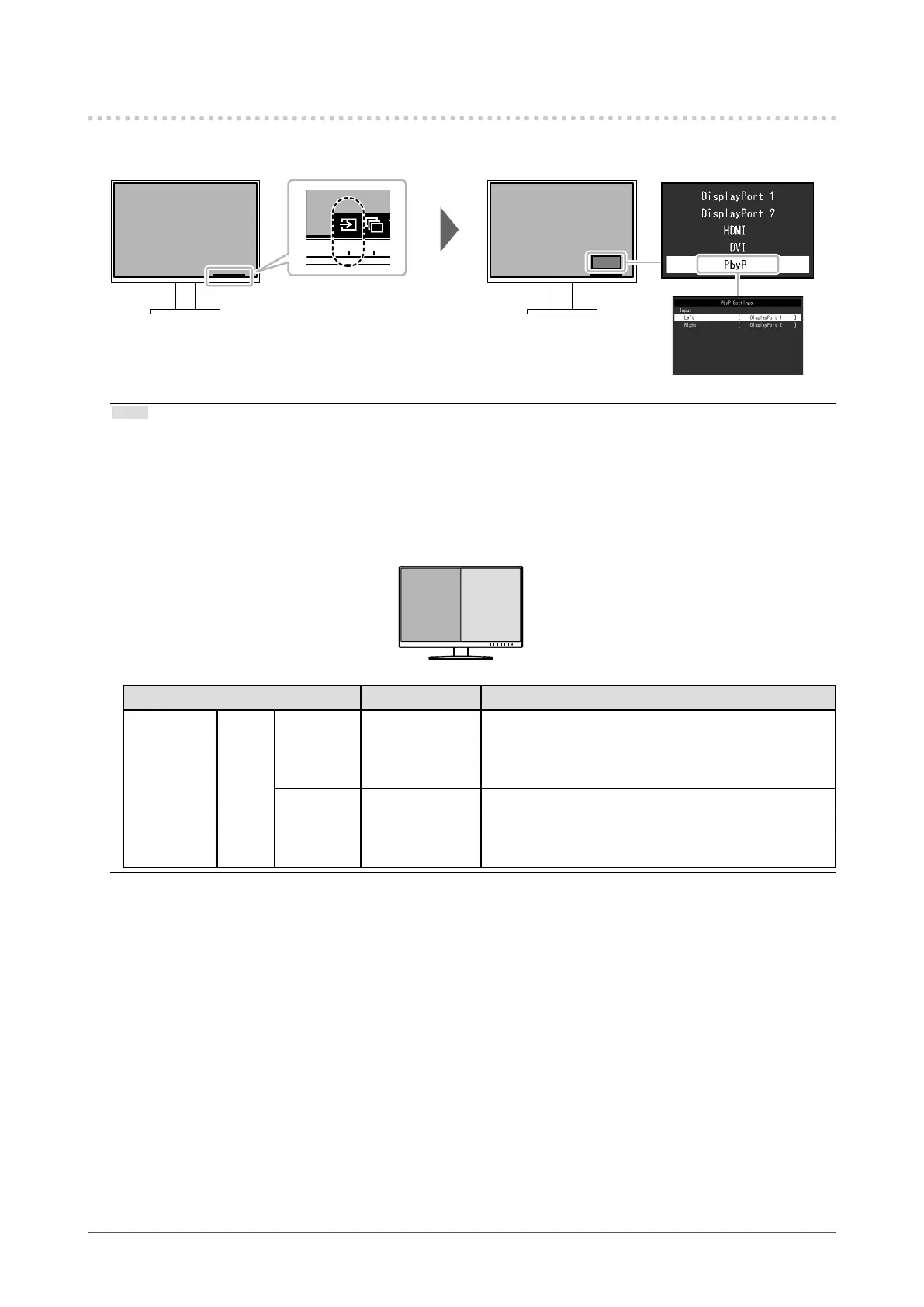
2-2. Switching Input Signals
When a monitor has multiple signal inputs, the signal to display on-screen can be changed.
Note
• "Screen InStyle" allows you to switch input signals using the shortcut keys on the keyboard.
• By selecting PbyP (Picture by Picture) display when a monitor has multiple input signals, windows can be
displayed side-by-side.
Because 2 windows can be displayed on a single monitor, the need for changing between signals is eliminated,
which leads to increased work eciency.
By selecting PbyP display, the combination of the signals to display on the left and right windows can be switched.
PbyP display image
A B
Function Setting Value Description
PbyP
Settings
Input Left DisplayPort 1
DisplayPort 2
HDMI
DVI
Select an input signal to be displayed on the left screen
of the PbyP display.
Right DisplayPort 1
DisplayPort 2
HDMI
DVI
Select an input signal to be displayed on the right
screen of the PbyP display.
13
Chapter 2 Basic Adjustment / Setting










 To Next Page