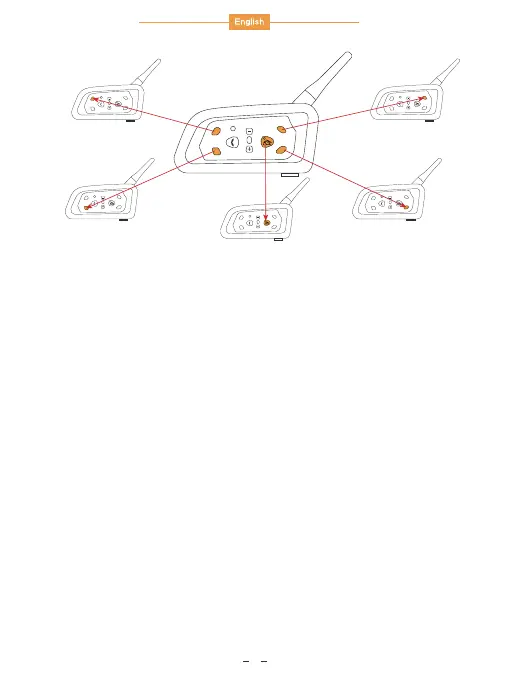
Long press the MOTOR buttons of main device and A device about
5s together, both device red & blue lights flash. After both of them
find each other, one of them will automatically initiate a pairing
connection, and the blue light will flash quickly. After a while, the
blue light flashes slow simultaneously, two devices can normal talk.
To pair the next sub-machine, press the MOTOR buttons first to
disconnect.
1. Pairing with A device
Long press the B buttons of main device and B device about 5s
together, both device red & blue lights flash. After both of them find
each other, one of them will automatically initiate a pairing connection,
and the blue light will flash quickly. After a while, the blue light flashes
slow simultaneously, two devices can normal talk. To pair the next
sub-machine, press the B buttons first to disconnect.
2. Pairing with B device
( C device, D device and E device have same pair way as
above, pairing relative C button, D button and E button. )
B
C
E
D
B
C
E
D
B
C
E
D
B
C
E
D
B
C
E
D
B
C
E
D
A
Main
C
B
D
E
4


 To Next Page