4
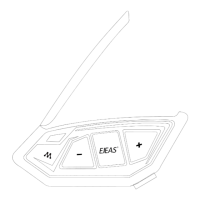
“Channel n”
There are 5 channels in total, click <Intercom Button> +
<Track Roller> to switch channels forward, note that you
need the whole team to keep the same channel in order to
talk to each other.
When the signal is unstable, you can switch channels to
get a better call.
Intercom channel switching
Mesh Intercom Function
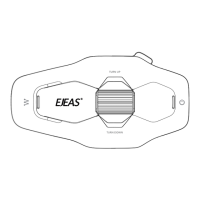
When using Mesh Intercom, you can click
<Intercom button> to mute the microphone, so
that your own voice will not be sent to others.
Click <Intercom Button> again to unmute.
Note: Valid only for Mesh intercom.
“Microphone Mute”
“Unmute the microphone”
Resonance Function
(When Mesh is enabled, Bluetooth
music can be played at the same time.)
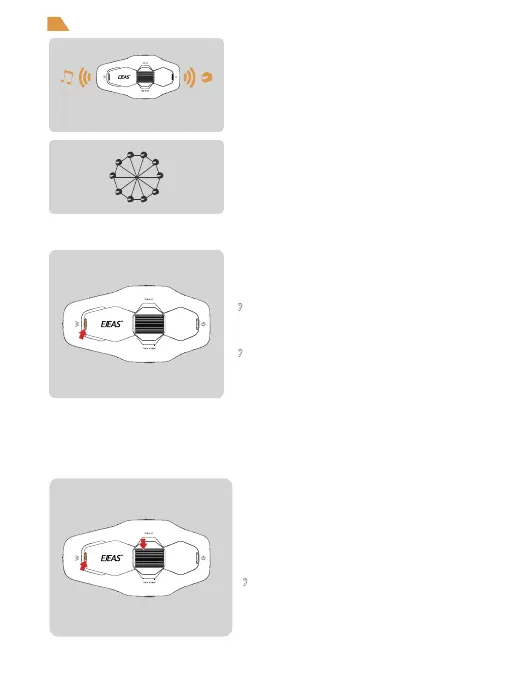
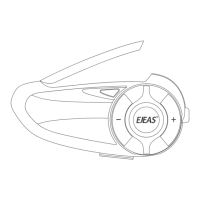
Mesh intercom is a multi-hop technology mesh network
intercom (communication frequency 470~488MHz), the
number of intercom, and is not subject to positional
restrictions, effective intercom range of personnel can
be moved arbitrarily, superior to the traditional chained
bluetooth intercom, but also has a longer transmission
distance and better anti-jamming ability.
Features: Intercom for up to 10 people on 5 channels.
Mesh Microphone Mute


 To Next Page