7
HFP-enabled
Intercoms
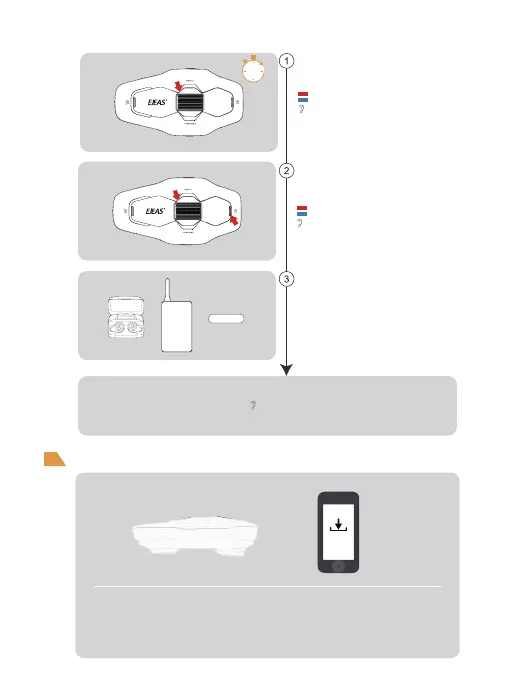
“Bluetooth intercom search”
Pair headset or other brand Bluetooth intercom search
Press and hold <Track Roller> (about 5s) until the red
and blue lights flash alternately and the pairing voice
prompts ‘Bluetooth intercom pairing.
Click <Power On/Telephone Button> + <Track Roller>
again, the voice prompts ‘Bluetooth intercom search’
and the red and blue lights flash alternately.
At this time, the intercom is searching for other intercom
that are in the pairing status, and after searching and
finding other intercom, it initiates the pairing
connection.
Other
“Pairing Success”
Pairing Success.
Red and blue lights flash alternately
Note: This feature is not guaranteed to be compatible with all Bluetooth headsets or Bluetooth
intercoms on the market.
5s
Firmware Upgrade
Use EJEAS mobile phone APP or magnetic dock to update the product firmware,
download and open the ‘EJEAS Upgrade.exe’ upgrade software, click the
‘Upgrade’ button to start upgrading, wait for the upgrade to complete.
Note: Charging and upgrading must be done with the data cable that
comes standard with the product.
“Bluetooth Intercom Pairing”
Red and blue lights flash alternately
EJEAS


 To Next Page