Troubleshooting
User Manual Biosen C_line Clinic / GP+
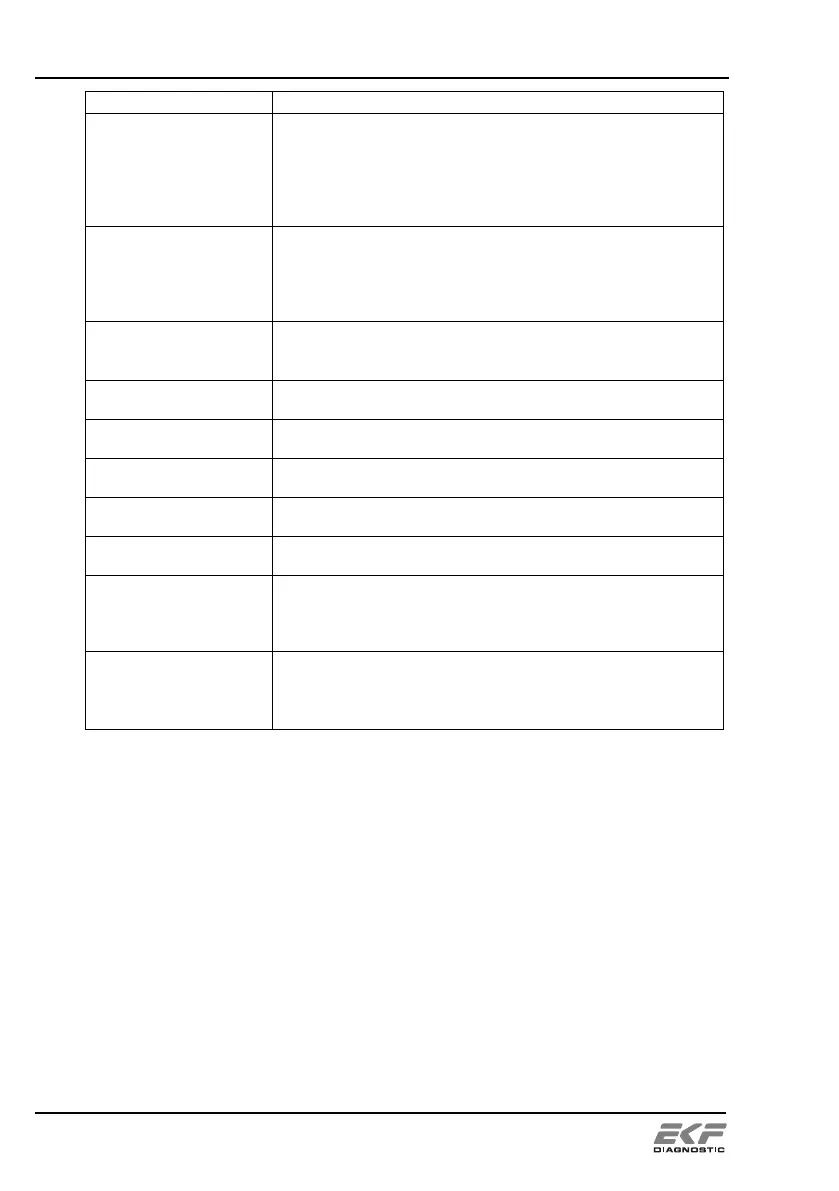
Explanation and rectification
Pivot arm error, pivot
arm is blocked
The pivot arm was blocked and was unable to reach its
position.
Remove the cause and confirm error with ok
The device tries to remove the error and if it manages goes
into readiness to measure. If the attempt is not successful,
the device returns to the error message.
Lifter error, lifter is
blocked
The lifter was blocked and was unable to reach its position.
Remove the cause and confirm error with ok
The device tries to remove the error and if it manages goes
into readiness to measure. If the attempt is not successful,
the device returns to the error message.
The range of sample preselection was not selected correctly.
select valid position for start or end value
the start value has to be lower or same as end value
Measurement started although balance = 0
Too many measurement card were inserted in succession
remove measurement card (prepaid-card)
Several attempts with manipulated measurement card
Smart card access
interrupted
measurement card (prepaid-card) was removed without advice
insert measurement card (prepaid-card) again
Devaluated or unknown measurement card (prepaid-card)
remove measurement card (prepaid-card)
Serial number of measurement card (prepaid-card) does not
match serial number of the device.
Remove measurement card (prepaid-card) . Insert a
(prepaid-card) with correct
serial number.
Barcode label does not comply with the specifications made
in section 6.3 or is not correctly positioned on the vessel.
stuck correctly formatted barcode label in the correct way
proceed barcode test


 To Next Page
 Loading...