ELAC DEBUT ConneX DCB41 | www.elac.com | Page 8
REMOTE CONTROL
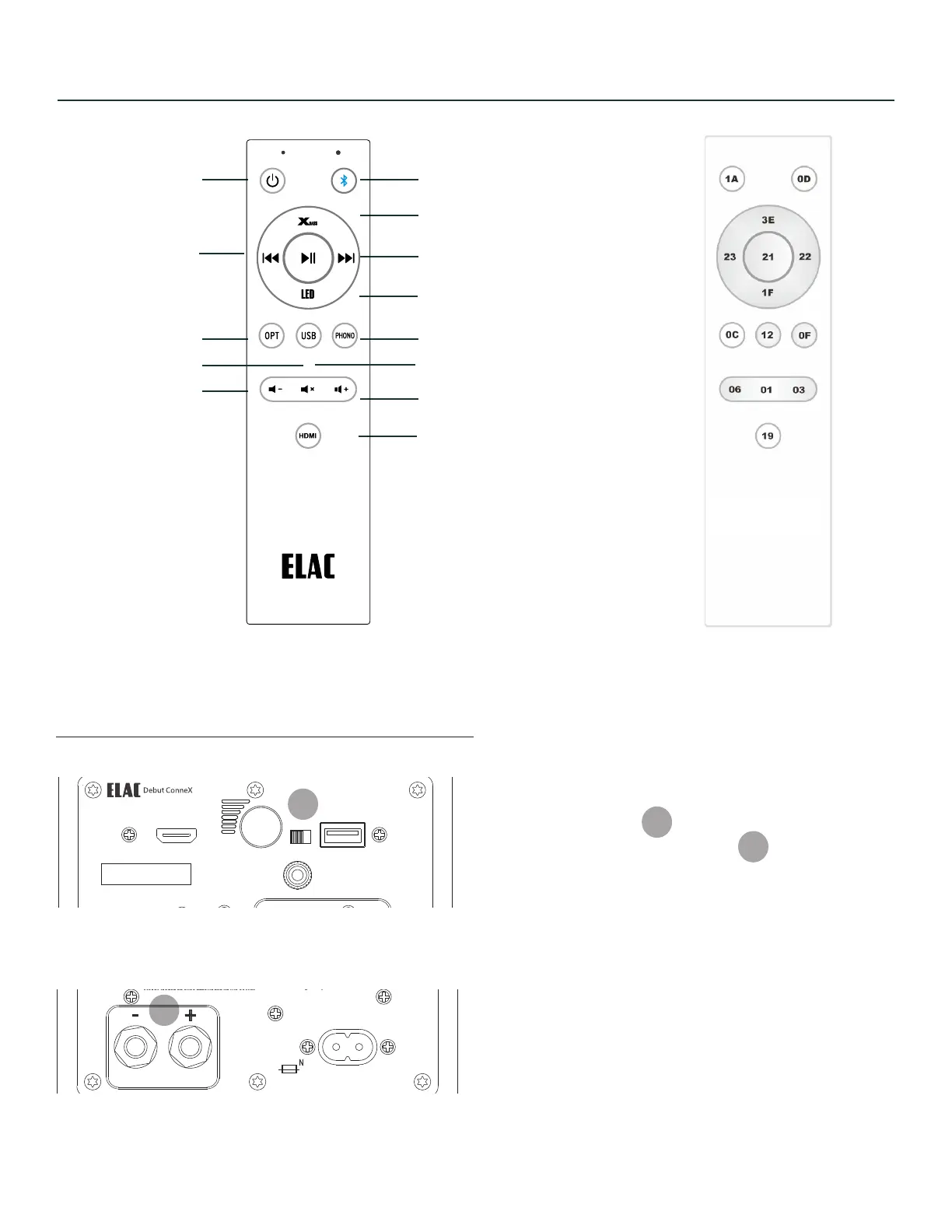
Hex CodesRemote Control
BT Source
Next(BT)
Volume Up
Phono Source
Volume Up
HDMI Source
Power ON/OFF
Optical Source
Volume Down
Previous (BT)
Adjus LED Intensity
Mute
USB Source
The L/R switch is in reference to
speaker output terminals.
If L/R switch is set to “L” then the
speaker output will be the LEFT
speaker.
IF L/R switch is set to “R” then the
speaker output will be the RIGHT.
SETTING LEFT or RIGHT SPEAKER
4
12
4
12
Model : DCB41
UPDATE ONLY
HDMI (ARC)
1938 N. Batavia St.
Suite K
Orange, CA, 92865
Fraunhofestrabe 16
24118 Kiel, Deutchland
SERIAL NUMBER
USB OPT SUB OUT
PHONO
ON/OFF
CAN ICES-0003(B)/NMB-003(B)
FCC ID: XXX-XXXXX
IC: XXXXX-XXXXX
Desinged by Elac
Made in China
SPEAKER OUT
120-240V~50/60Hz AC
80W
L/R
GND
OUT
SPEAKER
Model : DCB41
UPDATE ONLY
HDMI (ARC)
1938 N. Batavia St.
Suite K
Orange, CA, 92865
Fraunhofestrabe 16
24118 Kiel, Deutchland
SERIAL NUMBER
USB OPT SUB OUT
PHONO
ON/OFF
CAN ICES-0003(B)/NMB-003(B)
FCC ID: XXX-XXXXX
IC: XXXXX-XXXXX
Desinged by Elac
Made in China
SPEAKER OUT
120-240V~50/60Hz AC
80W
L/R
GND
OUT
SPEAKER


 To Next Page