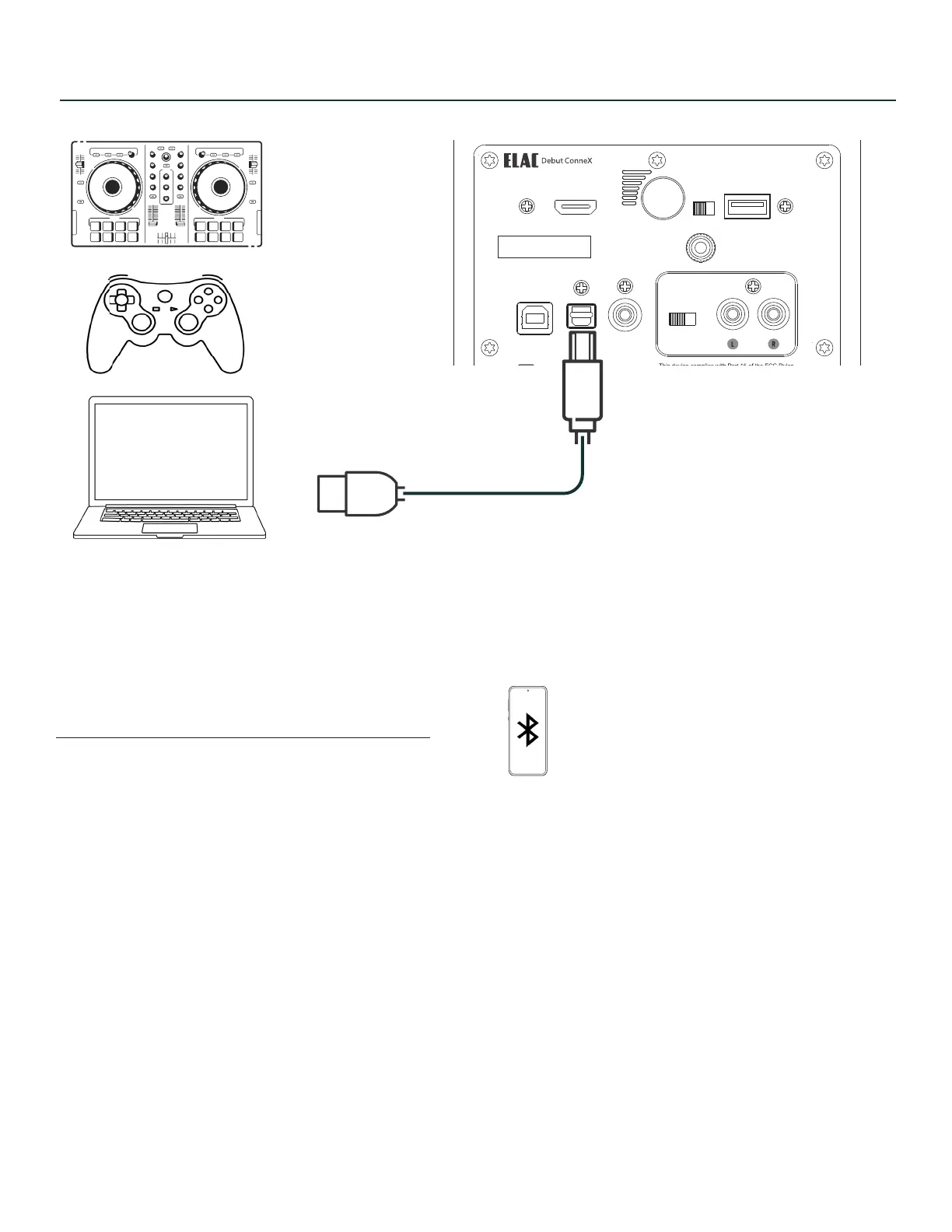
CONNECTIONS - COMPUTER
Connect to your USB devices USB Type B cable
(printer cable)
CONNECTIONS - BLUETOOTH
When initial power up - BT LED will flash if nothing is paired to it.
When LED is flashing, “ELAC DCB41” is vissible on your device.
Pairing can also be initited as follows:
Press and hold BT source on remote until LED flashes.
Press and hold rear volume button when in BT input until LED flashes
ELAC DEBUT ConneX DCB41 | www.elac.com | Page 7
Model : DCB41
UPDATE ONLY
HDMI (ARC)
1938 N. Batavia St.
Suite K
Orange, CA, 92865
Fraunhofestrabe 16
24118 Kiel, Deutchland
SERIAL NUMBER
USB OPT SUB OUT
PHONO
ON/OFF
CAN ICES-0003(B)/NMB-003(B)
FCC ID: XXX-XXXXX
IC: XXXXX-XXXXX
Desinged by Elac
Made in China
SPEAKER OUT
120-240V~50/60Hz AC
80W
L/R
GND
OUT
SPEAKER


 To Next Page