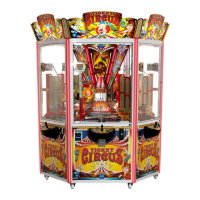
The provided document is an operator and service manual for the Elaut Ticket Circus pusher game, available in 3-player and 6-player configurations.
Function Description
The Elaut Ticket Circus is a redemption machine that pays out tickets. Players launch tokens onto a playfield using a joystick and a fire button. The objective is to win as many tickets as possible by collecting "tag points" (prize tags). The game operates on a closed-loop system, meaning tokens and tags that drop remain within the machine. A central elevator automatically returns won tags to the playfield, while tokens go into a hopper. The machine can be purchased with either a variable bonus or a fixed bonus game, but not both simultaneously. Both bonus systems aim to make the game more attractive by offering additional tickets or tokens.
Variable Bonus Game:
The bonus circle consists of 60 LEDs. When a game starts or after a bonus is won, the bonus circle displays a "start value," and the first LED lights up. As players drop tokens and prize tags, their values are added to the bonus circle, moving the LEDs forward. If the circle is completed without winning the bonus, an extra LED lights up, and 10 extra tokens are rewarded. The bonus display also increases by a "Bonus Step Value." The goal is to stop the LED exactly on the "STOP" position. Winning the bonus awards accumulated tickets, and the bonus resets to the start value. The "snake" (LED trail) lengthens each time the stop LED is passed.
Fixed Bonus Game:
This version also features a 60-LED bonus circle. Each token shot lights up one LED. After shooting 30 or 60 tokens (configurable), the game interrupts, and one LED starts spinning rapidly. Players must press the fire button to stop the spinning LED precisely on the "STOP" position to win the bonus. For every tag that drops, players receive tickets (unlike the variable bonus, where tags move the LED). If the LED passes the STOP arrows or the bonus game finishes, players receive 10 extra tokens. "Bonus chances" settings determine how many tokens must be shot to get a chance at the bonus (e.g., 450 tokens for "1 per playfield"). A "Consolation Prize" can be awarded (tickets or tokens) if the LED stops just before or after the STOP sign.
Important Technical Specifications
Models:
- 9992.1206 Ticket Circus 6pl (6-player)
- 9992.1203 Ticket Circus 3pl (3-player)
Dimensions & Weight:
- 3-player:
- Height: 2304 mm / 91 inch
- Depth: 1313 mm / 51.5 inch
- Width: 2003 mm / 79 inch
- Weight: 470 Kg / 1036 lbs
- 6-player:
- Height: 2304 mm / 91 inch
- Depth: 1757 mm / 69 inch
- Width: 1960 mm / 77 inch
- Weight: 650 Kg / 1433 lbs
Power Consumption:
- 3-player: 100-245V 47-63Hz, 320W (typical) / 475W (max)
- 6-player: 100-245V 47-63Hz, 515W (typical) / 775W (max)
EMOS Controller (PN 9236.0350):
This is the central control unit for the machine, managing various connections and functions including:
- Supply: High power input, low power connections (IntraXion bus 1 & 2).
- Communication: Comport 1 & 2 (not used), SD card holder for IOS updates, LAN 2 (not used), USB Host (type A for updates), USB Dev (type B for playfield-lift config), LAN 1 (RJ45 network).
- Inputs/Outputs: Coin acceptor, bill acceptor, card/swipe system, tilt sensor, dispenser options, mechanical meters, stereo audio jack (not used), main speaker, auxiliary speaker.
Tags:
The machine uses various prize tags with different values and shapes (square, hexagon, flower, star, heart) and corresponding Tag IDs (1-7).
Usage Features
EMOS System (Tablet-based Control):
The Ticket Circus utilizes the "EMOS" Technology, controlled via an Android tablet (included) or mobile phones with EMOS software. This allows wireless adjustment of settings, display of system functionality, and activation of test procedures. Apple iOS and Windows OS are not supported. Operators must ensure all settings comply with local codes and laws.
Game Play:
- Token Launch: Players use a joystick to move a token arm sideways and a fire button to launch tokens. Holding the fire button enables continuous "rapid fire."
- Payment Options: The machine accepts coins, bills, or swipe cards.
- Display: A central display shows the number of tokens received.
- Bonus Display: Dedicated displays for variable or fixed bonus games, showing bonus values, extra tokens, and tickets to pay.
Operator Settings (via EMOS Tablet):
- Payout Settings:
- Ticket Value: Set the value of one ticket (e.g., 0.005 €).
- Token Price: Set the price of a token (max 1.0 €).
- Bonus Levels: Configure bonus levels to give extra tokens for certain amounts, which increases payout percentage.
- Variable Bonus: Adjust "Bonus Start Value" (50-800) and "Bonus Step Value" (10-100) to control bonus difficulty and payout.
- Fixed Bonus: Adjust "Bonus Value" (100-9000) and "Bonus Chances" (1 per playfield, 1 per 2 playfields, etc.) to influence payout.
- Mercy Tickets: Set the number of tickets given at the end of a game (cannot be 0).
- Playfield Configuration: Select from 6 predefined configurations (e.g., 1000 points, 900 points) which determine the number and type of prize tags on the playfield.
- Money Settings:
- Game Price: Minimum amount to start a new game.
- Coin/Bill Value: Configure values for connected coin and bill acceptors.
- Swipe Settings: Set swipe value and game value for card systems.
- Money Limitations: Set "Credit limit" and "Money limit" to disable acceptors when limits are reached.
- Meter Dividers: Configure electronic pulses for money in and tickets out to match mechanical meters.
- Sound Settings: Adjust volumes for main volume, effects, win sounds, spoken messages, attraction sounds, and background music.
- Language: Select spoken message language (English, French, Dutch, German).
- RGB Settings: Configure machine lighting (fixed color or rainbow effect) for doors and corners.
Maintenance Features
Unpacking and Installation:
- Remove plastic, place machine on an even surface.
- Open cabinet and glass doors, connect power cord, lift router antenna.
- Remove tie wraps from escalator hoppers and token protectors.
- Install top signs by screwing on brackets and LED boards, then sliding plexi signs into place.
- Locate 6 bags of 1000 tokens inside the machine.
Preparing Playfields:
- Each playfield requires 450 tokens, divided over two decks.
- Each hopper requires 250 tokens.
- Manually fill playfields with tags according to the selected "Playfield configuration."
- After filling, shoot approximately 500 tokens, then restart the game and counters via EMOS "Payout settings."
Filling Ticket Dispenser:
- Ticket dispensers are on the left side of each playfield next to the bonus sign.
- Open glass window, fill dispenser with tickets (use special adaptor for fast loading).
- Guide tickets through the input, press the yellow button, and pull the first ticket out.
Red Button on Bonus Sign:
- Located on top of the bonus sign.
- Press for "ERROR 4" (no tickets detected).
- Can be used to payout "Tickets owned" (if not paid out during error), clear error, or clear "Tickets owned" (requiring manual ticket distribution). Note: "Tickets owned" always count in payout regardless of physical distribution.
Error Codes:
The manual provides a comprehensive list of error codes (e.g., Network Error, Playfield not connected, Main door switch opened, Ticket payout not possible, various LIN Event Time-outs, RFID errors, Mech Counter errors, Hopper Time-out, Duplicate TAG detected, Playfield disabled). These codes help diagnose issues with network, software, playfield connections, sensors, motors, and hardware.
Testing Functions (via EMOS Tablet):
- Control Panel: Test joystick (left/right) and fire button functionality in real-time.
- Hopper: Test "Move Left," "Move Right" for escalator hopper movement, and "Dispense coin" to launch a token.
- Lift: Enter "Testmode" to test lift movement: "Go down" (to middle position), "Load items" (to down position), "Dispense" (to highest level). "Leave Testmode" returns the lift to the top position.
Relocating Power Outlet:
Instructions are provided to move the power outlet from the top to the bottom of the machine (or vice-versa) by unscrewing plates, disconnecting connectors, and swapping cover plates.
Accounts and Details:
- Accounts Menu: Displays "Total in" (money in), "Total out" (tickets out value), "Balance" (profit), and "Percentage" (payout). Accounts can only be reset when all playfields are online.
- Details Menu: Provides granular data like "Coin in," "Bill in," "Card in," "Prize ticket out," "Bonus ticket out," and "Mercy ticket out." These counters cannot be reset directly but are reset when accounts are reset.
System Information:
The "Info" menu displays serial number, machine name, cost, type, extra information, location, IP address, software version, last update, production date, and date of first use. It also allows editing these details and removing the machine from the EMOS program.

 Need help?
 General


 To Next Page