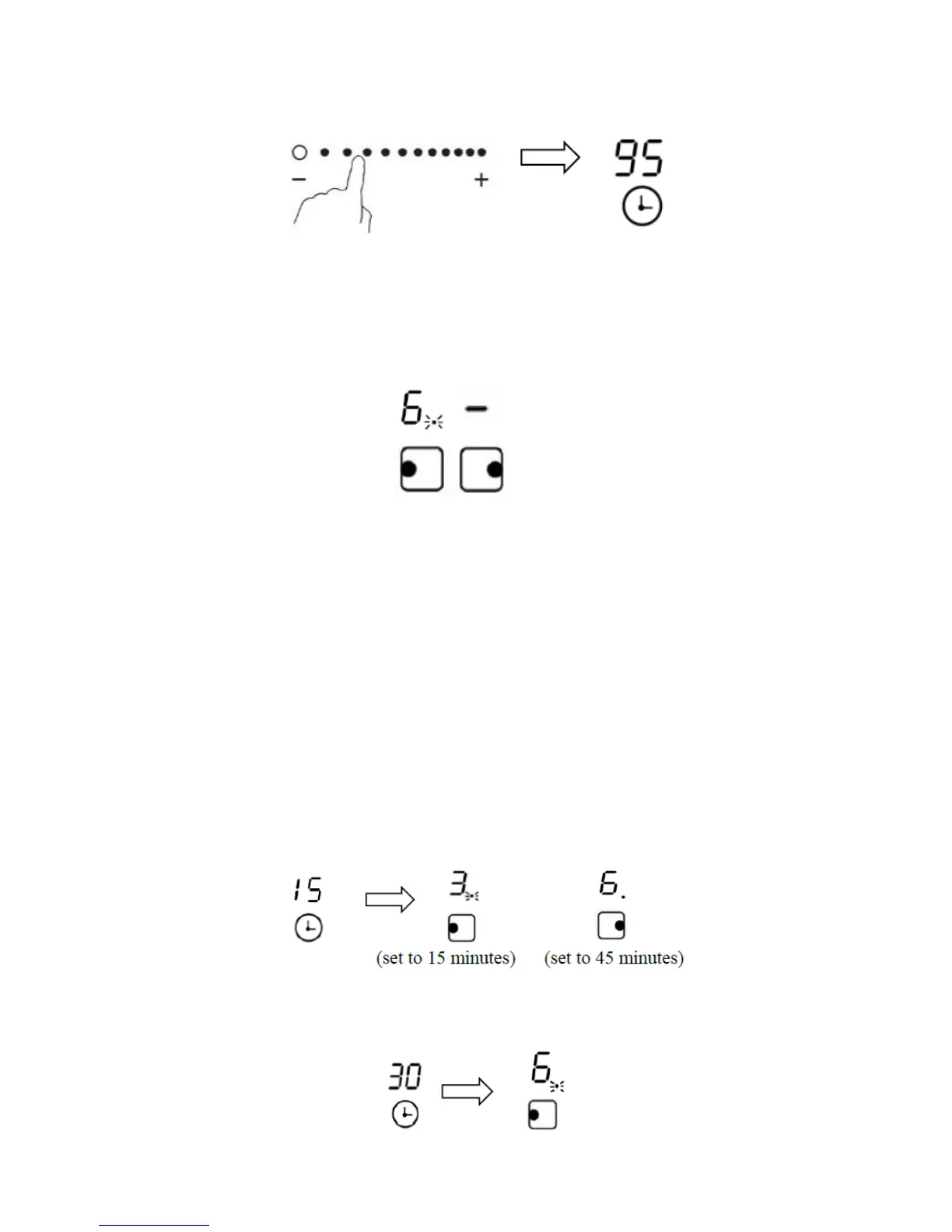
8. Set the timer setting by sliding the controls to right. Now the timer will from 15 minutes
become 95 minutes.
9. When the time is set, it will begin to count down immediately. The display will show the
remaining time.
10. There will be a red dot in the right bottom corner of power indicator which indicate that
zone has been selected.
11. When cooking timer is end, the corresponding cooking zone will be switch off
automatically.
If the timer is set on more than one zone
1. When you set the timer for several cooking zone, the red dot of the related cooking zone
are indicated. The timer display show the “minutes” count down for the shortest timer
zone and show the longest timer once the first one finished.
2. For example, the left zone has been set to power 3 level, 15 minutes timer and right
zone, power 6 level, 45 minutes timer. The timer display will show the shortest timer and
flash the indicator as left zone.
3. Once the left zone timer has end, the corresponding zone will switch off. Then the right
zone will show a new timer and the dot of the right zone will flash again.


 To Next Page