15
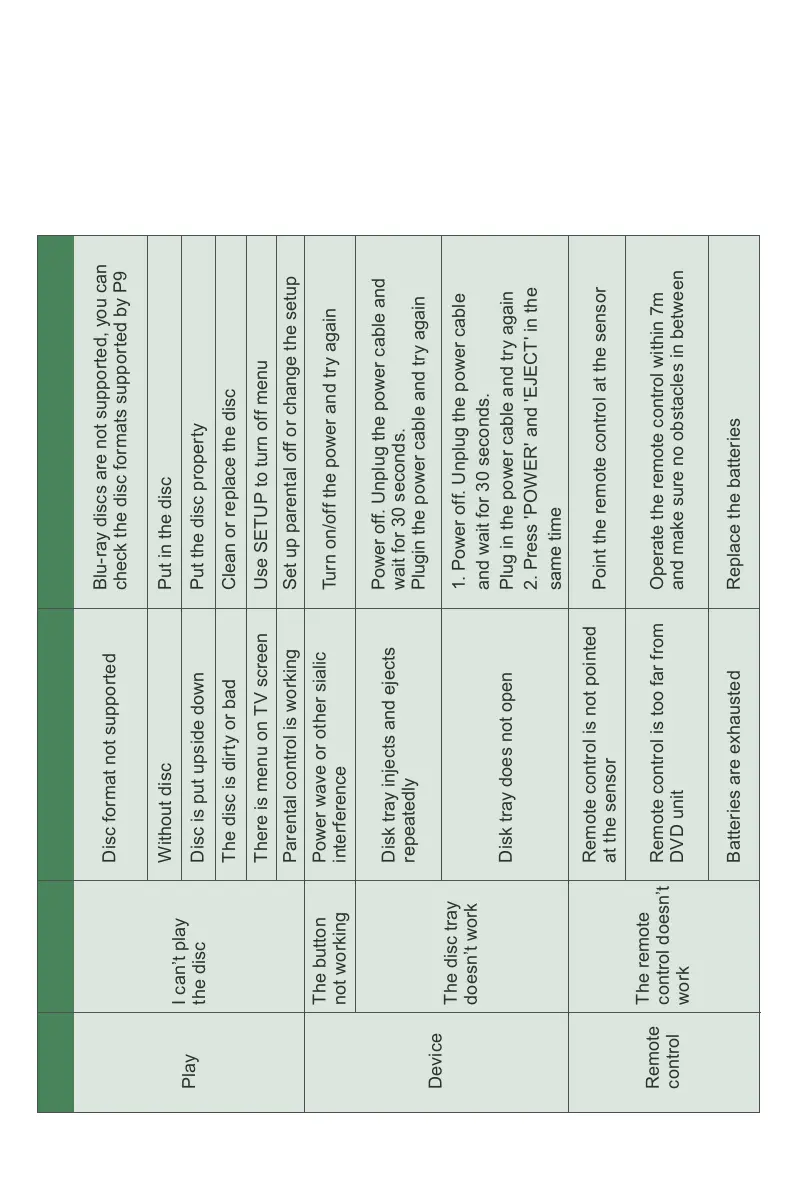
Play
Device
Remote
control
I can’t play
the disc
The disc tray
doesn’t work
The button
not working
The remote
control doesn’t
work
Disc format not supported
Without disc
The disc is dirty or bad
There is menu on TV screen
Parental control is working
Power wave or other sialic
interference
Disk tray injects and ejects
repeatedly
Disk tray does not open
Remote control is too far from
DVD unit
Operate the remote control within 7m
and make sure no obstacles in between
Batteries are exhausted
Disc is put upside down
Blu-ray discs are not supported, you can
check the disc formats supported by P9
Put in the disc
Clean or replace the disc
Use SETUP to turn off menu
Set up parental off or change the setup
Turn on/off the power and try again
Power off. Unplug the power cable and
wait for 30 seconds.
Plugin the power cable and try again
1. Power off. Unplug the power cable
and wait for 30 seconds.
Plug in the power cable and try again
2. Press 'POWER' and 'EJECT' in the
same time
Remote control is not pointed
at the sensor
Point the remote control at the sensor
Replace the batteries
Put the disc property
Symptom Cause(s) MeasuresCategory



 To Next Page