6. Finger control: To operate, turn the Ignition Key
to the ON or “I” position. Pull the right-
hand lever
towards you and the machine moves forward. The
more you pull the lever the faster the scooter goes.
To brake, release the lever. Again, the
lever is released
the quicker you will stop. To
reverse, pull the left lever towards you.
NOTE
. The controls can be changed for customers
with a left-
hand bias. Please contact the local
dealer for information.
IF YOU ARE NOT COMPLETELY SURE OF THIS
FEATURE THEN CONTACT THE DEALER
BEFORE OPERATING THE
SCOOTER.
NOTE: To avoid excessive strain on the tiller /
handlebar assembly, never push or pull the scooter
in freewheel mode if a user is on-
lever UPWARDS
to engage freewheel mode (no
brakes - caution). Push the lever DOWNWARDS
engage Drive mode.
Charging Point: The charging point is situated on
the battery case (see Battery Charging
this manual for further details).
Warning! If the freewheel device is in
“freewheel” mode, the braking is disabled.
Never select the freewheel mode if the Scooter
is on a slope or could be pushed onto a slope.
Brakes
There are 2 braking systems. The first works with
the finger controls. When the finger control is
released t
he scooter will automatically brake and
bring the scooter to a stop. When the scooter
stops
the automatic brake will engage. This will stop the
vehicle rolling forward or backward. When the
scooter starts moving then the brake will
automatically disengage.
If the battery should run
out, the brakes automatically engage.
NOTE: When Freewheel is selected, a secondary
braking system is applied automatically to limit the
maximum speed. You may notice this system
causing drag when moving the scooter in
freewheel mode.
When the scooter is switched off the brakes are
automatically engaged. This is called “Failsafe
Braking”. Also, if the batteries are flat, the brakes
are applied. There may be occasions where you
may wish to move the scooter
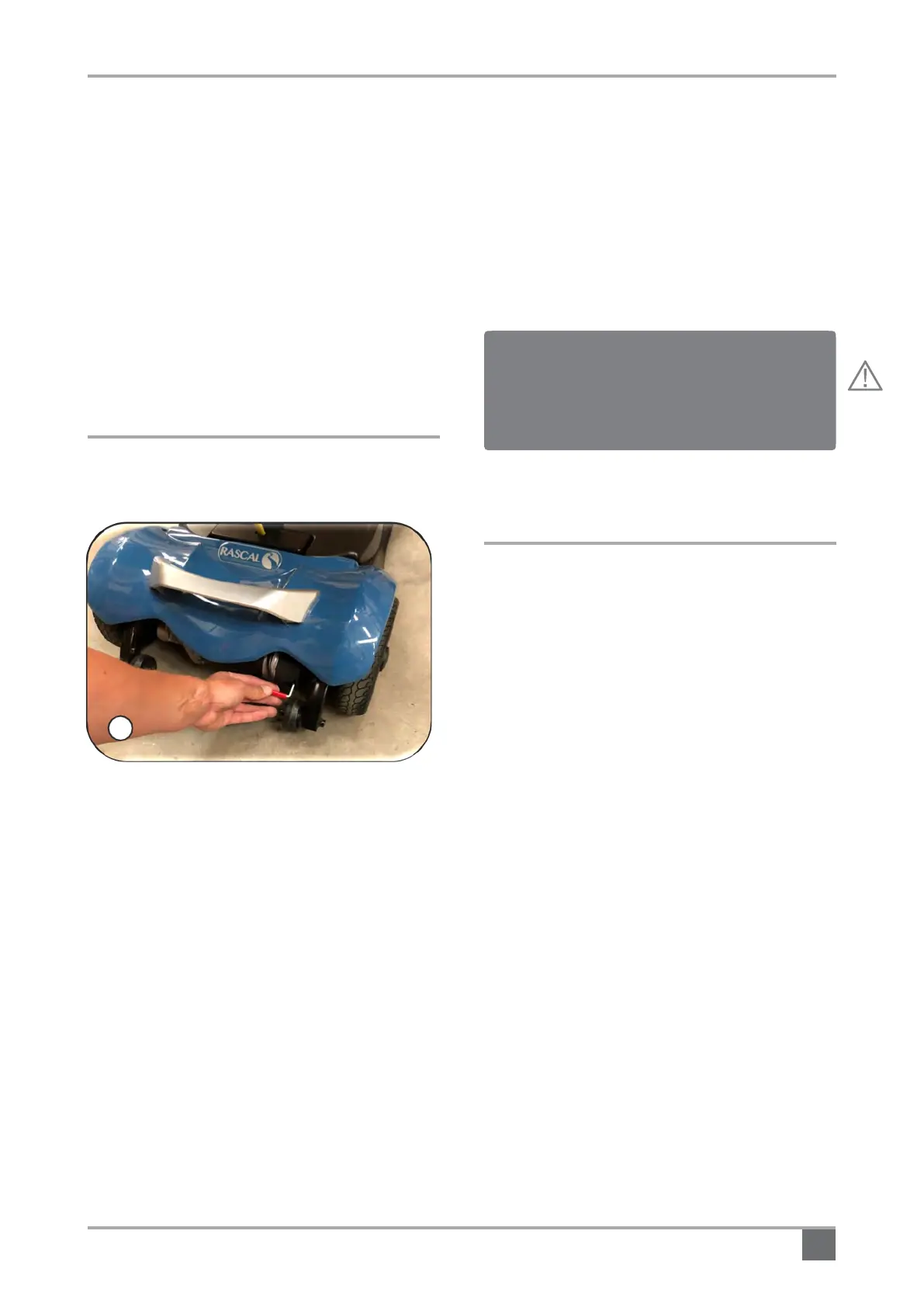
this there is a Freewheel device fitted.
The Freewheel device allows the scooter to be
pushed without powe
r. To activate, first locate the
lever. When standing behind the scooter, it is
located on the right hand side of the rear of the
scooter (Fig.6).
• Make sure the Ignition key is in the OFF position.
When standing at the back of the scooter, move
the lever UP towards you (see the label) - the
scooter can now be pushed in Freewheel.
• Move the lever DOWN (away from you) to
engage drive. The scooter is now braked. This is
the normal operating position.
9



 To Next Page