EasyManua.ls Logo

ElectrIQ P12HPW - Page 17

ElectrIQ P12HPW
24 pages
Print Icon
To Next Page IconTo Next Page
To Previous Page IconTo Previous Page
Loading...
17
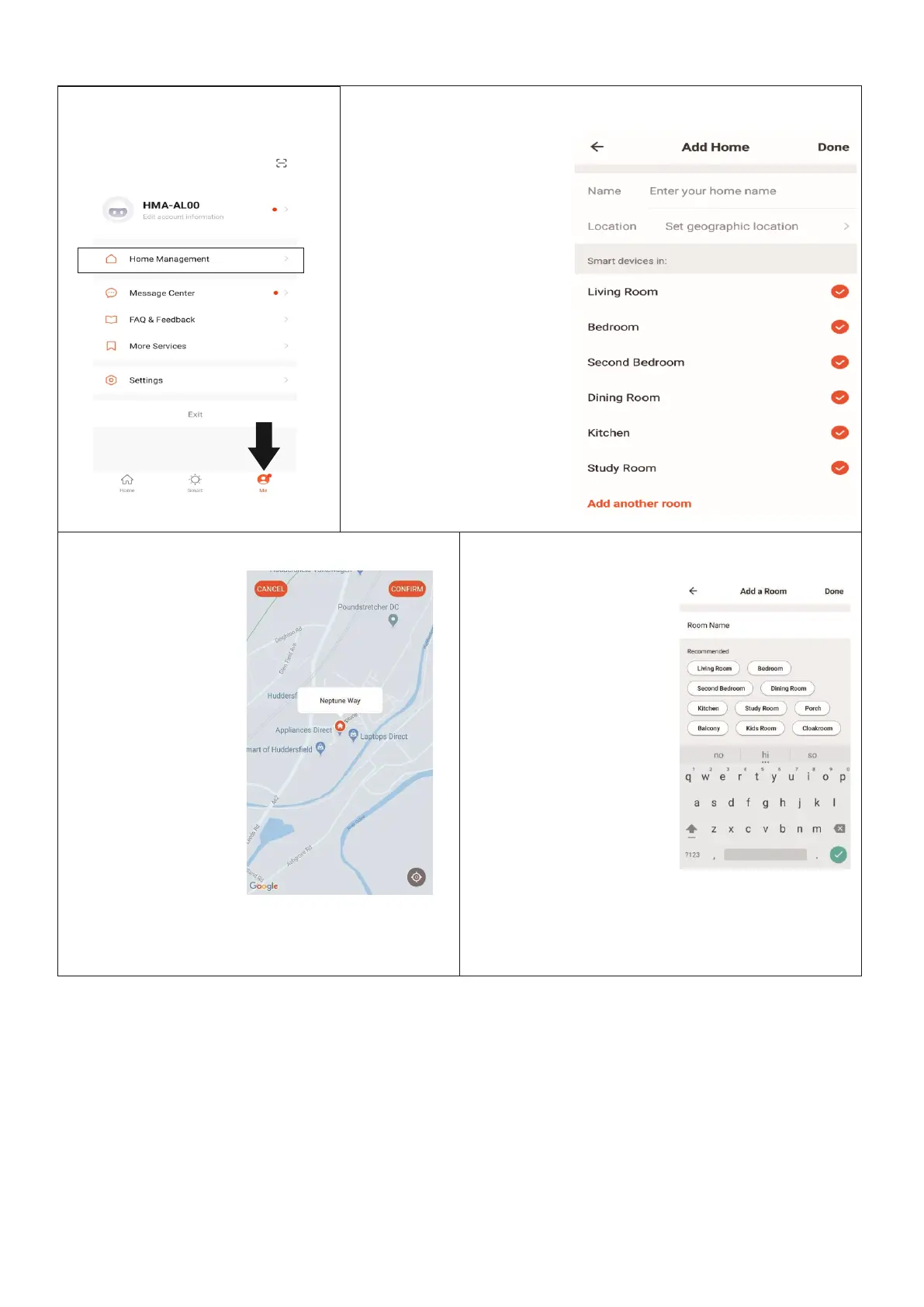
CREATING ROOMS
1. ON THE HOME SCREEN
Press on Home Management
2. Type in a name for your home,
3. Press on the location
button to select the
location of your home.
(See SETTING YOUR
LOCATION below)
4. New rooms can be
added by pressing the
ADD ANOTHER ROOM
option at the bottom.
(See ADD ANOTHER
ROOM below)
5. Untick any rooms that
are not required on
the app.
6. Press DONE in the top
right corner
SETTING YOUR LOCATION
ADD ANOTHER ROOM
Use your finger to
move the orange
HOME symbol.
When the symbol is
in the
approximate location
of your home, press
the confirm button
in the top right
corner.
Type in the name of the
room, and press Done in
the top right corner
button

Other manuals for ElectrIQ P12HPW

Related product manuals