- 19 -
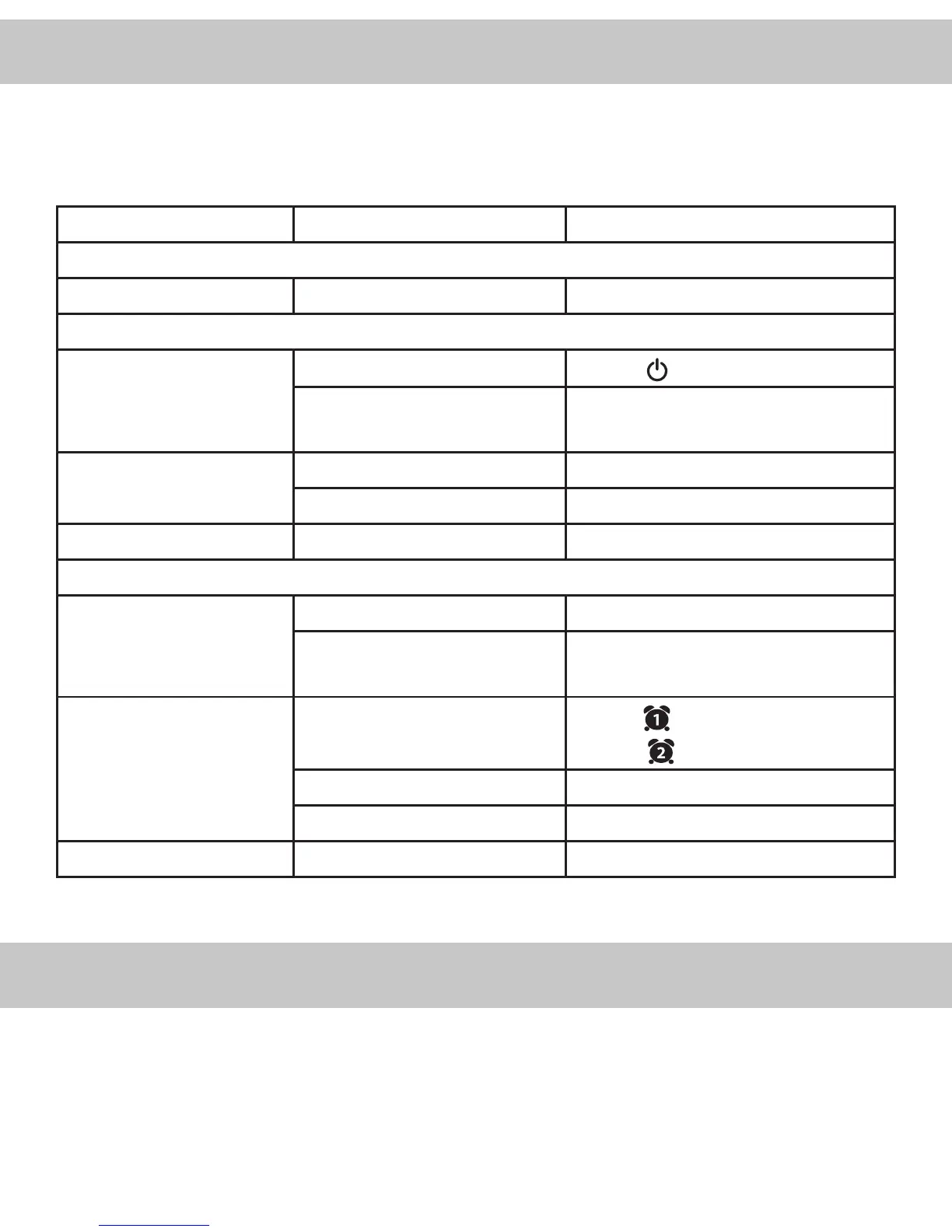
If you experience a problem with this unit, check the chart below before
contacting us for service.
SYMPTOM POSSIBLE CAUSE POSSIBLE SOLUTION
GENERAL
Power does not come on AC cord not plugged in Insert plug rmly into AC outlet
RADIO
No Sound Power is not on
Press the button
VOLUME control at minimum
position
Turn the VOLUME control up
Noise or sound distorted
on AM or FM
AM-interference from trac Turn the radio for better AM reception
FM-antenna wire not extended Extend antenna wire
SYMPTOM POSSIBLE CAUSE POSSIBLE SOLUTION
CLOCK
Incorrect Time Clock not set Set the clock
Battery is inserted incorrectly,
or depleted
Check/replace the battery
Alarm does not turn on Alarm is not set to turn on
Hold the button to set ALARM 1
;
Hold the button to set ALARM 2
Clock is not set Set the clock
Alarm time is not set Set alarm time
No display Dimmer is set to Standby Mode Press Dimmer button
1. Disconnect the unit from any power sources before cleaning.
2. Keep the unit away from magnetic objects, water or heat sources.
3. Use a clean soft, damp cloth moistened with lukewarm water to clean the
cabinet. Never use chemical cleaners that could damage the nish of the unit.
TROUBLESHOOTING
CARE AND MAINTENANCE


 To Next Page