6 electrolux
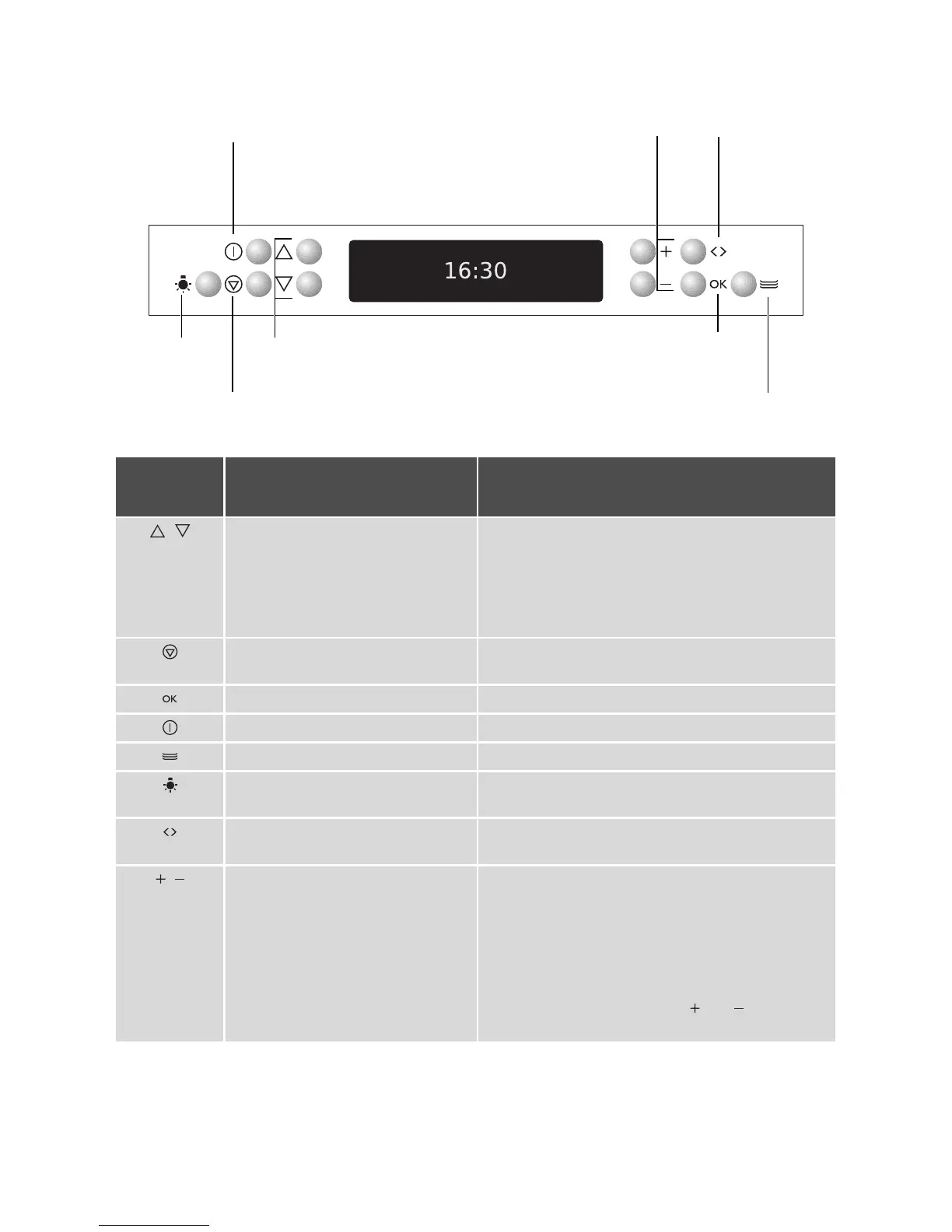
On/Off
Set values
Oven lighting
Main menu
Select
options
Scroll
Confirm
Drawer heater
Sensor
field
Function Comment
, To move down and up in the menu. When a function is active:
•
Press once: Change to the higher menu (func-
tion remains active), after 5 seconds move again
into the active menu option
•
Press twice: Up and down in the higher menu
(function switches off)
To display main menu. Functions set switch off
(except for countdown timer).
To confi r m.
To switch appliance on or off.
To switch drawer heater on or off.
To switch the internal oven light on or
off.
Use this function to illuminate the oven interior, e.g.
for cleaning.
Select time functions, additional
functions and
Meatprobe
.
, To set values (e.g. temperature,
time, weight, degree of cooking).
•
To activate value:
–
Press once: Present symbol flashes
–
Press twice: Value can be set
•
To se t val u e s :
–
Press once: To set value in single steps
–
Hold button down: To set value in fast steps
•
When setting a cook time or the time, the dis-
play can be reset to zero if
and are pressed
at the same time.



 To Next Page