electrolux 5
The electronic oven controls
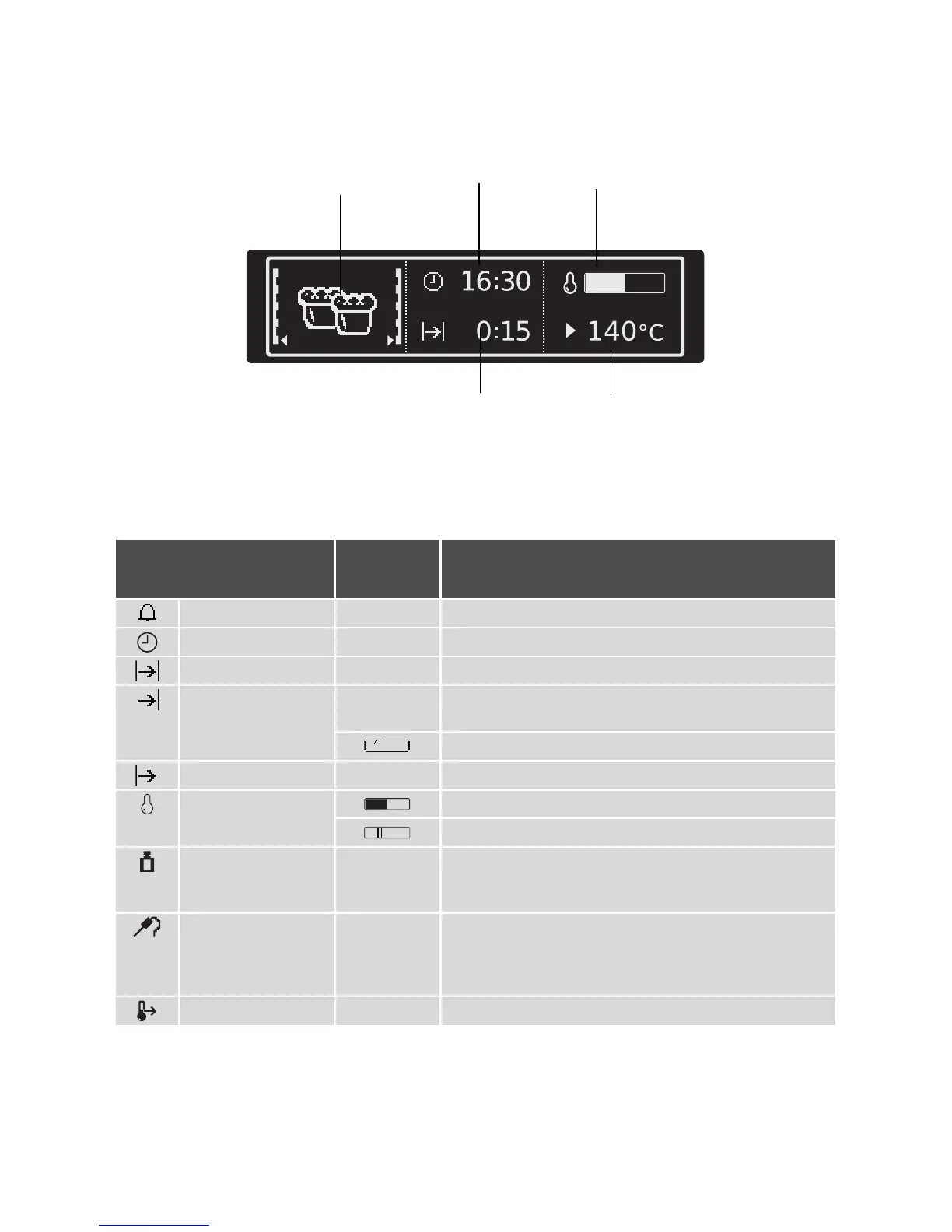
Indicators
Symbols
Certain symbols are displayed in the dis-
played according to the function set.
Touch Control sensor fields
The appliance is operated using Touch Con-
trol sensor fields. You control the functions
by touching the sensor fields.
When you are using the controls make
sure that you only touch one sensor
field. If your finger is applied too flat, a
neighbouring sensor field could be
touched as well.
Menu option symbol
(with oven shelf level)
Clock
Time functions
Heat indicator
Temperature
Weight
Meat core temperature
Symbol
Display
(Examples)
Function
Countdown timer 4:30 The countdown timer is active.
Time 10:00 Indicates the current time set.
Duration
1:00
Indicates the period of time required for the cooking process.
End Time
14:05 Indicates the time at which the cooking process is com-
pleted.
End time is calculated when
Meatprobe
inserted.
Delay start 0:45 Indicates the time from which the cooking process will run.
Te mper atu re Indicates how far the oven has heated up.
Rapid heat up is active (shortened heating up time).
Weight 1.5 kg Options:
–
Automatic weight is active.
–
Weight can be changed.
Meatprobe
75°C Options:
– Meatprobe
is plugged in
– Meatprobe Automatic
is active.
–
Core temperature can be changed.
Heat+Hold
80°C
Heat+Hold
is activated.



 To Next Page