18
SETTING OVEN CONTROLS
Setting Convection Bake
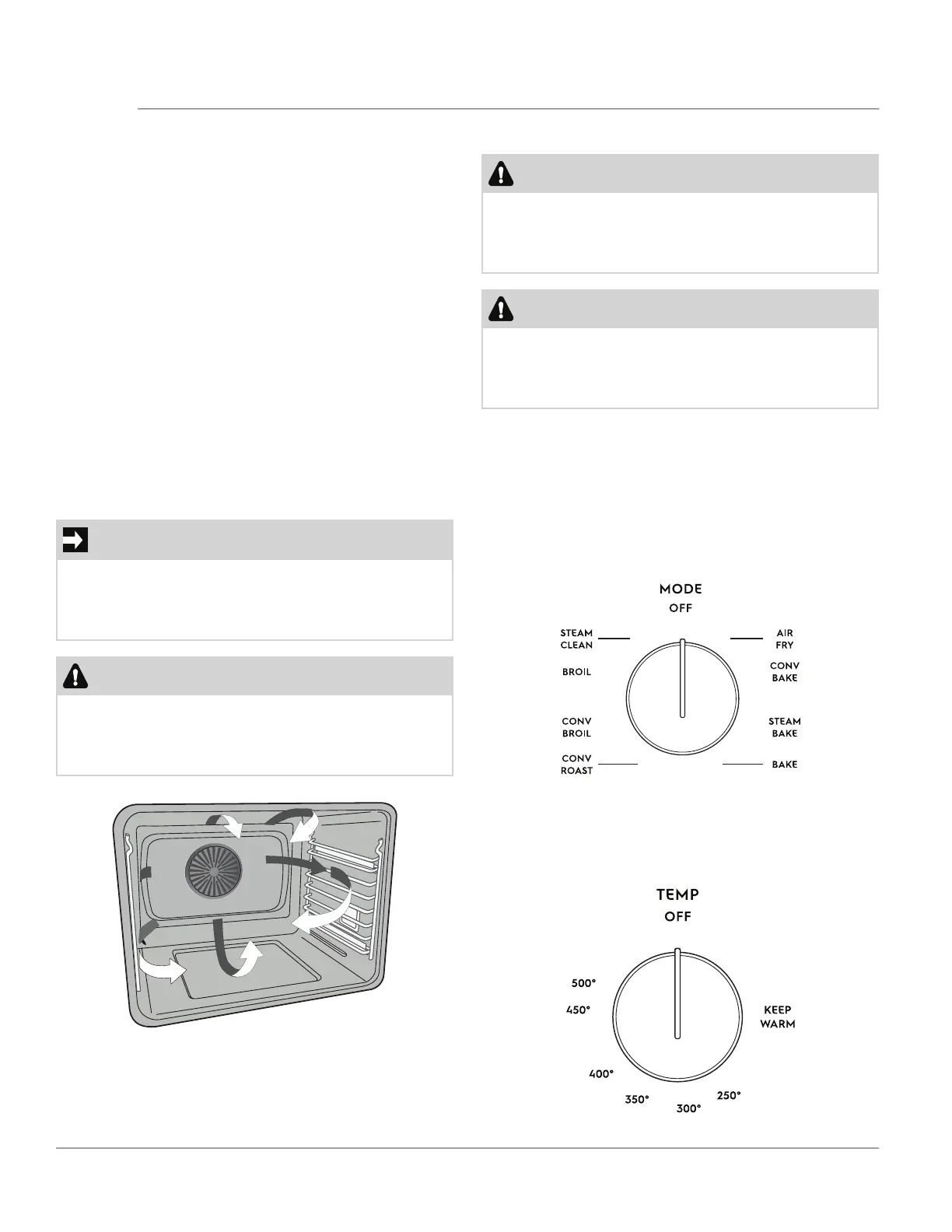
Convection functions use a fan to circulate the oven’s
heat uniformly and continuously around the oven (Fig-
ure 12).
This improved heat distribution allows for fast, even
baking and browning results. It also gives better baking
results when using two oven racks at the same time.
Heated air flows around the food from all sides, sealing
in juices and flavors. Breads and pastry brown more
evenly. Most foods baked in a standard pan will bake
faster and more evenly with the convection feature.
Multiple rack baking may slightly increase bake time
for some foods, but the overall result is time saved.
Benefits of Convection Bake:
• Superior multiple oven rack performance.
• Foods bake more evenly.
• Foods can bake up to 25 to 30% faster.
IMPORTANT
When using convection bake, decrease your normal
cooking times. Adjust the cook time for desired done-
ness as needed. Time reductions will vary depending
on the amount and type of food to be cooked
CAUTION
Be aware that the convection fan will continue to run
after the door is opened. This is normal. Use caution
when reaching inside of the oven. Hot air will be
pushed out of the appliance.
Figure 12: Air movement using convection
To set convection bake:
CAUTION
Always use pot holders or oven mitts when using the
oven. When cooking the oven interior, oven racks,
and cooktop will become very hot which can cause
burns
CAUTION
Do not bake foods directly on the oven bottom. To
avoid damaging the oven interior and surfaces, al-
ways bake foods in the oven using bakeware posi-
tioned on an oven rack.
1. Arrange oven racks while the oven is still cool.
2. Allow oven to preheat the oven for 8-to-10 min-
utes before baking. Preheating is not necessary
when roasting, cooking casseroles, or broiling most
foods
3. Turn the oven mode knob to the conv bake posi-
tion (Figure 13).
Figure 13: Oven Mode Knob
Figure 14: Oven Temperature Knob
4. Turn the oven temp knob to the desired tempera-
ture position (Figure 14).



 To Next Page